The benefits of focusing on student literacy
Academic success is literacy. Implementing a Multi-Tiered System of Supports (MTSS) can promote students’ literacy growth and the positive outcomes districts desire.
Why? Because while literacy is often synonymous with English language arts, it’s a necessary skill in all subject areas.
It’s no secret then that having strong literacy skills predicts students’ overall educational achievement and future opportunities. Students with solid literacy skills gain a deeper understanding of content and effectively communicate that understanding. Districts that specifically focus on improving literacy are more likely to graduate students who are
- active learners,
- proficient readers, and
- fluent writers.
On the other hand, a lack of literacy skills and the associated frustration and discouragement students feel is closely linked to negative reactions to education as a whole. Early and continuous support in literacy can prevent future academic struggles.
The importance of literacy plans
A cohesive, district-wide literacy plan maintains consistency and upholds equity in literacy education. Literacy plans give all schools within the district a shared, common vision and set of practices. When everyone is on the same page, it allows for a tighter focus on the training, resources, and implementation necessary for a successful initiative.
Schools in Colorado and Virginia are implementing plans to improve literacy for all students. These plans address the diverse needs of students and help close achievement gaps. They intend that all students, regardless of which school they attend, will receive high-quality literacy instruction and support.
Preparing your back-to-school literacy plan
Creating a comprehensive literacy plan will involve many different components, but here’s a place to get started:
| Component | Description | Examples/Details |
| Goals and Objectives | Clear, measurable literacy goals for the district. | Increase reading proficiency by 10% by year-end. Ensure all students read at grade level by the end of Grade 3. |
| Assessment Strategies | Tools and methods for assessing student literacy levels, including formative and summative assessments. | Formative: Running records, reading fluency checks. Summative: Standardized tests, end-of-year exams. |
| Core Instruction Components | Research-based high-quality literacy instruction practices for all students. | Phonics instruction. Guided reading. Vocabulary development. Writing workshops. Universal tools, like Clicker word processor. |
| Intervention Strategies | Specific, evidence-based interventions for students who need additional support, based on assessment data. | Small group instruction. One-on-one tutoring. Specialized reading programs. Clicker Books and Clicker Writer. |
| Professional Development and Training | Training for teachers to implement literacy strategies effectively, with ongoing support and collaboration. | Workshops on latest literacy research. Peer coaching and mentoring. Webinars on instructional strategies. |
| Monitoring and Evaluation | Methods for tracking progress and adjusting the plan as needed, including regular review meetings and data analysis. | Bi-weekly progress monitoring. Data analysis meetings. Adjustments based on assessment outcomes. |
Addressing the needs of all students: The role of MTSS
Literacy plans will require interventions for students not finding success in core instruction. A Multi-Tiered System of Supports (MTSS) is the foundation for a successful literacy plan. MTSS is a framework that helps identify and support students who struggle with core literacy instruction. It uses data-driven decision-making to provide interventions at varying levels of intensity based on student needs.
Tier 1: Universal Interventions
At Tier 1, all students receive high-quality, research-based literacy instruction. This universal approach gives every student access to effective literacy practices. Regular assessments help identify students who may need additional support.
Tier 2: Targeted Interventions
Students who do not respond adequately to Tier 1 instruction receive additional support through Tier 2 interventions. These targeted interventions are more intensive and often delivered in small groups. They are designed to address specific literacy challenges and help students catch up to their peers.
Tier 3: Intensive Interventions
For students with significant literacy needs, Tier 3 provides individualized and intensive interventions. These students receive one-on-one support, often involving specialized instruction and frequent progress monitoring. Tier 3 interventions are crafted to the unique needs of each student.
Even with excellent core instruction programs, some students will need more intensive instruction. Each school’s intervention team, principals, and teachers will need to determine the most appropriate and effective interventions for these students. However, they should also simultaneously document its impact. When evaluating an intervention, consider the following criteria:
- Documented evidence of effectiveness based on student outcomes.
- Research-backed procedures, standards, and guidelines for implementation.
- Support through high-quality and ongoing professional development.
Crick Software understands the importance of investing in high-quality literacy solutions. That’s why we provide tools like Clicker, which can be used to support literacy skills for all students, at all levels.
Clicker Success Stories
Everett Public School District
Everett Public Schools, in Everett, Washington, was seeking a solution for students who had trouble with writing and language processing. They ultimately decided to invest in Crick Software’s Clicker program. Clicker has been a transformative tool for many students at Everett School District. Its assistive features facilitate extended writing and help to develop literacy skills for students at all levels.
Barb Lark, a former educator and volunteer with the Special Education Technology Center of Washington, shared, “It’s a literacy tool that allows for immediate expression of ideas. It allows children to go from stock answers to broader self-expression. For students with learning challenges, it allowed access that they otherwise wouldn’t have had. It allowed them to access independent reading materials. It allowed them to express themselves in writing, in a way they otherwise wouldn’t have been able to do.”
Northview High School
Northview High School, part of the Special School District of St. Louis County, Missouri, invested in a Site License for their school. They were searching for a tool that covered all aspects of literacy, from reading and writing to speaking and listening. In choosing Clicker, they found a solution that supported literacy across the curriculum, was easy to implement, and was hugely engaging for their students.
Christy Hagy, an Occupational Therapist, commented, “I ran a project on the topic of "All About Me" with some of our students. I saw an amazing level of success with students creating their own talking books in Clicker and presenting them back to their classes. For some students, this was the first time they had been able to present to their peers.”
Invest in literacy success with Clicker's all-in-one writing solution
Building a back-to-school literacy plan with a Multi-Tiered System of Supports encourages a targeted approach to improving student achievement. A well-structured literacy plan gives all students high-quality instruction and the interventions they need to succeed. By investing time and resources into creating and implementing your literacy plan, you can make an impact that actually moves the needle on student outcomes.
Literacy technology, like Clicker, can support your literacy instruction and interventions. Clicker provides differentiated, accessible tools that support students' literacy development, which ultimately makes it easier for teachers to deliver effective instruction and track progress.
Download this free Literacy Action Plan for this back-to-school season.
Ready to see how Clicker can support your literacy plan and improve student outcomes? Book a 1-1 demo today to learn more about our complete writing solution and how it can benefit your district.
Assessing writing can be a difficult process.
For many teachers, balancing the progress across different aspects of writing, like handwriting or spelling, to judge a student’s overall progress can sometimes feel unfairly subjective. I know writing moderation often includes multiple teachers for exactly this reason. So, for those who are looking for a more data-driven approach to assessing students’ writing, Clicker Analytics might be your new favorite tool for the classroom!
I am focusing on upper elementary students for this data collection as it includes measuring spelling accuracy. As phonetically plausible spellings are acceptable in lower grades, they add a layer of complexity to tracking this metric (though it is possible) in a time-efficient way.
So, here’s how Clicker Analytics can be used to collect valuable writing data to help you to measure your students’ writing fluency and accuracy:
1. Pick your assessment window
Do you want to collect your data every week, monthly, quarterly or to compare the start to the end of the year? With Clicker Analytics, any of these assessment windows are a viable option without creating a huge workload, but quarterly is a great place to start if this is the first time you’re collating quantitative writing data.
2. Complete a baseline assessment
You need to have a starting point for your data – so a baseline assessment is a must. The important thing to remember here is that the work is completed independently and is completed in a set amount of time.
A great baseline assessment that I often used was descriptive writing for 20 minutes. I’d provide my class with a range of visual prompts (landscapes, animals, characters, etc.) to help spark ideas and give them the best opportunity to write confidently.
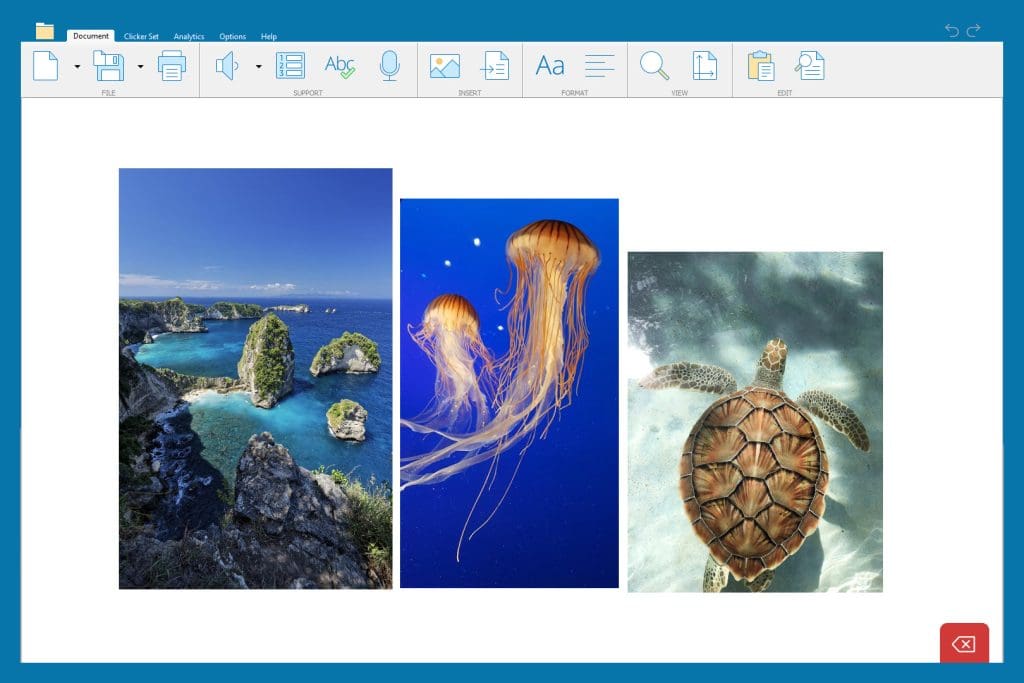
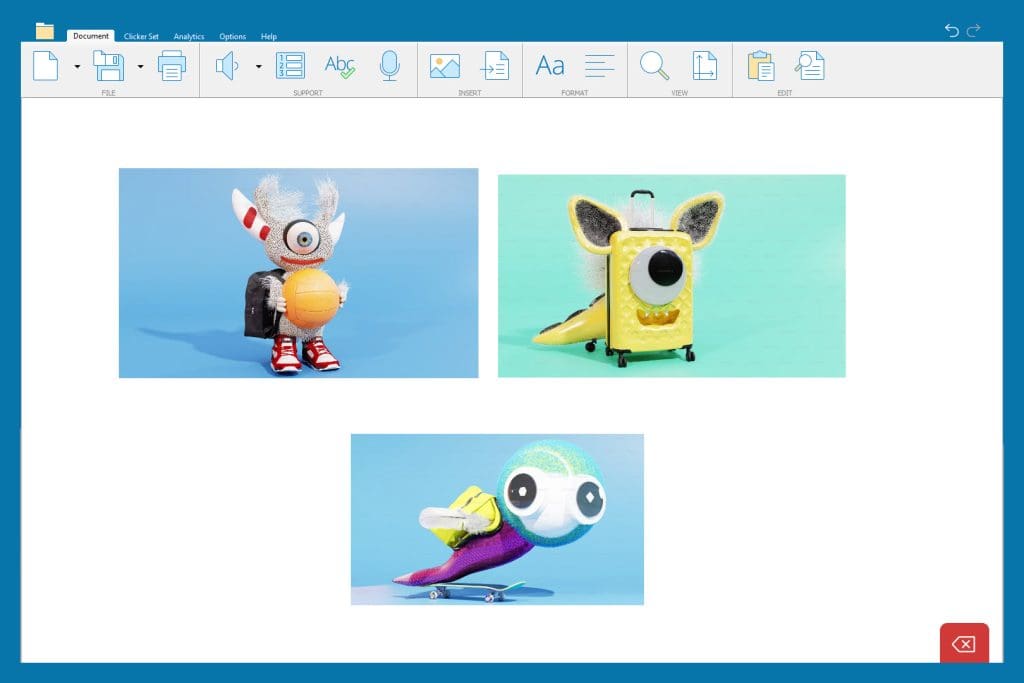
3. Start collecting the data
There are only two pieces of data that are going to be tracked:
- Total number of words
- Words spelled correctly (to measure the accuracy of writing)
At first glance, this data could be very time-consuming and tedious to collect. But, if the work is completed on Clicker, Clicker Analytics does all the counting for you.
Before your students complete their writing task on Clicker, turn off spell check to make sure the data is accurate.
Then, once the writing has been completed, you can instantly see your quantitative writing data when you open Clicker Analytics, starting with the total number of words.

And by clicking on Spell Check and choosing ”Uncorrected Words” from the drop-down menu, you can see how many words have been spelled incorrectly.

To find your number of correctly spelled words, complete this equation:
Total number of words – words spelled incorrectly = words spelled correctly
(For the example above, 27 – 4 = 23)
And there you have your two pieces of trackable writing data!
If you’d like to create a standardized score to track the accuracy of your students’ writing, you need to divide the total number of words by the words spelled correctly.
For the example above, this would be 27 divided by 23 which equals 1.17*
*A perfect score is 1 – so the larger the number is, the higher the levels of inaccuracy.
Here’s a simple example of how you can collate the data:

4. Repeat!
You can now collect your data as frequently as you would like – and over a range of writing genres and topics to get a quantitative understanding of how your students’ writing is progressing to help shape your overall impression of their writing development.
What next?
For those of you who already have a Clicker subscription, here are some other resources you might find helpful:
- Make assessment fun and engaging with Clicker
- Use Clicker to support a whole class writing journey
- Nonfiction writing with Clicker
Or if you are new to Clicker and would like to find out more, you can:
As a school administrator, you’re tasked with many responsibilities. You oversee budgets, implement district initiatives, evaluate data, and manage staff. And that barely scratches the surface. The list of duties is exhaustive.
Among these responsibilities, the most critical and challenging task is creating an environment where every student reaches their full potential. And it’s not just about test scores. It’s about ensuring that every student, regardless of ability level, can thrive academically, socially, and emotionally.
Educators know that each child has unique needs that must be met for them to find growth and success. Across the country school leaders are grappling with the same challenge: seeking effective strategies to enhance student achievement.
The best approach is a Multi-Tiered System of Supports (MTSS).
Understanding MTSS
A Multi-Tiered System of Supports (MTSS) is a proactive, data-driven framework. It is designed to provide high-quality instruction and interventions. These are tailored to meet the diverse needs of all students. MTSS encompasses three levels of support:
- Tier 1: High-quality core instruction that all students receive. It includes universal supports provided to all students to promote successful outcomes. This should meet the instructional needs of 80% of students.
- Tier 2: Targeted, small-group interventions for students who require additional assistance beyond universally provided. This should meet 15% of the remaining 20% who still needed support after Tier 1.
- Tier 3: Intensive, individualized interventions for students with significant and persistent learning or behavioral needs. The 5% remaining that don’t respond to Tier 2 interventions should benefit from this personalized approach.
MTSS helps students overcome challenges in general classrooms by providing different levels of support. The level of intervention should match the level of assistance they need to stay on pace with their peers.
If students don’t progress enough at their current level of support, MTSS provides a structure to move them up to the next level of intervention.
By systematically identifying and addressing student needs, MTSS aims to
- reduce behavioral challenges,
- foster a positive and inclusive school environment, and
- improve overall student achievement.
Four benefits of MTSS in improving student achievement
- Data-driven decision-making: One of the most significant strengths of MTSS is its reliance on data. Routine monitoring of student performance allows educators to make informed decisions. It provides insight into the effectiveness of their instructional strategies and the need for additional support. Interventions that are timely and targeted have a greater impact on student achievement.
- Early intervention: MTSS emphasizes the importance of early identification and intervention for at-risk students. Addressing issues immediately helps schools prevent minor challenges from becoming significant obstacles. Early intervention improves student outcomes. It also reduces the long-term costs associated with remedial education.
- Inclusive education: All students should have access to the support they need to succeed. MTSS provides a continuum of interventions that promotes an inclusive educational environment. No student can fall through the cracks, regardless of ability level or background. Everyone has the opportunity to reach their full potential.
- Flexibility and responsiveness: The tiered structure of MTSS allows for flexibility. This makes it easier to respond to individual student needs. Adaptability is crucial. Educators can adjust the intensity and nature of interventions based on ongoing assessment data. This helps ensure that support is both effective and efficient.
Effective, targeted intervention for increased student achievement
Educational software programs like Crick Software's Clicker can help all learners experience success. It provides every student with just the right level of support and challenge. These solutions play a crucial role in enhancing literacy and learning outcomes within the MTSS framework.
Integrating Clicker at each MTSS Tier
- Tier 1: Universal tools that support all students, like text-to-speech and word prediction software, can be integrated into the general education curriculum. These tools help create an accessible learning environment for all students. This promotes universal design for learning (UDL) principles.
- Tier 2: A group of students struggles with executive functioning and organizing ideas. A Tier 2 strategy could incorporate a targeted tool, like Clicker Boards. Clicker Boards can help these students organize their ideas and prepare them to write. Targeted tools provide scaffolding to help students overcome specific literacy challenges.
- Tier 3: Some students will need even more support. They may require specialized tools designed to overcome significant literacy difficulties. Using Clicker, educators can capture students’ ideas with Voice Notes, or quickly input ideas into Sentence Sets for students to complete word-by-word with Clicker’s point-and-click access. Educators can closely monitor the students’ progress with Clicker Analytics, which tracks how students have constructed their writing using Clicker’s support features. These tools provide intensive interventions that are tailored to individual needs.
Case study: Improving literacy achievement with Clicker
Rose Racicot was introduced to Clicker when working for the Kent School District in Kent, Washington. Installed on all student computers for their 1-1 device program, Clicker emerged as a powerful engagement tool that effectively addressed the learning barriers students faced.
Clicker’s implementation as a whole class tool was instrumental in making students with disabilities feel included and confident in their abilities. The use of Clicker
- boosted student motivation,
- improved self-confidence,
- and increased inclusivity by eliminating the need to separate special education students from the general education classroom.
Racicot shared, “I knew Clicker would help meet learning goals because if you had content you wanted the whole class to access, you could create supports at different levels and introduce it to everyone. Clicker gives you a vehicle to differentiate the same content for all students very quickly and easily.”
The school saw significant improvements in student writing proficiency. For students requiring additional support, targeted interventions using Clicker's personalized features helped close achievement gaps. For those with the most significant needs, individualized plans incorporating Clicker resulted in measurable progress in literacy skills.
MTSS: Helping all students find success
MTSS offers a powerful framework for improving student achievement. It provides differentiated support based on individual needs. Integrating educational technology within this framework enhances its effectiveness. This is especially true for improving literacy outcomes.
By adopting MTSS and leveraging tools like Clicker, K-12 school administrators can create inclusive, responsive, and data-driven educational environments.
To learn more about Clicker and how it can support your educational goals, schedule a free consultation. Together, we can ensure that every student has the opportunity to succeed.
Vanessa Simons has extensive experience using Clicker to support her son, Oliver, who is minimally verbal. Over the years, she has witnessed remarkable progress in Oliver's verbal communication skills, including a 60% increase in his verbal utterances since using Clicker.
Recently, Vanessa shared a glowing update about Oliver’s progress and the impact Clicker has had on his learning journey:
“I wanted to reach out to express my gratitude for your product Clicker and share how it has significantly impacted my son’s learning journey. Today, my son can effortlessly and independently type his work using Clicker. The Sentence Sets feature, along with auditory support, has been instrumental in helping him become independent with his typing. Recently, my son has started transcribing moments from his life using Clicker. His ability to chronologically express his experiences has been remarkable. This newfound communication skill has given me invaluable insights into how he processes information. His increased verbal utterances allow him to express his daily needs and negotiate alternatives effectively.”
We always love hearing how Clicker is making a difference in children’s learning and opening up the world of communication for them. Hearing from Vanessa was absolutely fantastic!
Vanessa also discussed with us her recent blog post, which explores combining Bloom’s Taxonomy (a framework designed to encourage higher-order thinking) with the supportive features in Clicker to scaffold her son’s learning. Vanessa has found that this approach can provide valuable insights into instructional planning and support for neurodiverse learners.
How Vanessa uses Clicker following Bloom’s Taxonomy:
- Remembering (Knowledge): Clicker provides leveled reading passages and matching exercises to help children recall facts through visual and audio cues.
- Understanding: Clicker’s Connect Sets and Word Banks help children combine pictures and words to form sentences, reinforcing understanding through scaffolded learning.
- Applying: For minimally verbal children, this might involve using communication tools like picture cards to express needs. Clicker aids in expanding vocabulary and applying it in different contexts, enhancing communication skills.
- Analysing: Clicker Sets help children recall and sequence stories and answering “WH questions” (who, where, what, why, when, etc.) to develop comprehension.
- Evaluating: Although complex evaluations may be challenging for some minimally verbal children, they can still express preferences and make choices. Clicker Boards can be used to evaluate characters by describing them or sorting character traits to show their understanding of a character’s motives.
- Creating: Clicker’s Talk Sets and Clicker Boards encourage creative writing and storytelling, helping children combine ideas and produce original work.


Find out how Clicker can help your students
Vanessa’s personal experience using Clicker with her son continues to show fantastic development. Oliver has progressed from no typing skills to independently typing and creating structured narratives using Clicker. If you’d like to explore using Clicker in your setting, here are some useful links to get you started:
- Using Clicker for whole class teaching
- Make assessment fun and engaging with Clicker
- See how schools are using Clicker in their classrooms
Or you can always talk to a member of our friendly team by emailing usinfo@cricksoft.com or calling 203 221 2697.
We are excited to share a recent success story from AT Paraprofessional Nettie Reese. Nettie has worked with the AT team at Carroll County Public Schools in Maryland for 24 years, supporting students with learning differences, and Clicker is one of her go-to AT solutions!
Nettie shared a memorable moment involving a student who had been struggling with seizures, affecting her mobility and memory. Using Clicker, the student was able to regain her learning independence and complete her work alongside her classmates.
“The beautiful thing was, she was able to join in with her peers saying, ‘Look what I did. I did this.’ And that’s what it’s about - her differences didn’t make a difference when she used Clicker. She was equal to everyone else in her class.”
Nettie explains how she uses the ready-made resources on LearningGrids as a starting point and, with just a few quick tweaks, has personalized resources that cater to each student's individual needs.
"It’s important to modify the work so that they have stepping stones and scaffolding to make them feel like everyone else – successful."
We have loved hearing from Nettie and the impact Clicker is having in her district. To learn more about this success story and how Clicker can support your students:
- Read the full success story
- Get in touch with our team: usinfo@cricksoft.com
Despite strides made in the aftermath of the COVID-19 pandemic, learning gaps remain. Test scores are still down, absenteeism is on the rise, and a looming teacher shortage lurks in the shadows. Because of these concerns, school districts are turning to federal funding to bolster initiatives for better student outcomes.
Many educational leaders allocate federal funds to support literacy goals. Literacy is one of the most important indicators of a child’s success. It shapes their academic journey and impacts their ability to
- communicate effectively,
- participate as citizens, and
- succeed professionally.
Using federal funds on literacy support tools can significantly enhance academic outcomes for students, especially those requiring additional support. Research shows that increased education spending leads to improved student performance. When per-student spending is higher, outcomes improve. The biggest improvements happen when states and districts prioritize equity.
To boost recovery efforts, the Department of Education encourages school leaders to consider the ways that technology can advance equity. Federal funding should be used to implement strategies that make a meaningful impact on developing the “whole learner.”
But figuring out how to use the government's money can be tricky. Educational leaders must understand how to navigate the federal funding landscape.
A federal funding overview for K-12 school administrators
ESSA
The Every Student Succeeds Act (ESSA) is the federal K-12 education law of the United States. It extended more flexibility to states in controlling their education systems, while ensuring transparency for parents and communities.
Under ESSA, every state must measure student performance in key subjects like math, reading, and science. They must provide easily understandable “State Report Cards” to inform parents and communities about school performance. Importantly, ESSA mandates reporting on per-student expenditures, which is tied directly to student performance.
The purpose of ESSA is “to provide all children significant opportunity to receive a fair, equitable, and high-quality education and to close achievement gaps.” To achieve this, ESSA allocates funds to school districts through formula grants and subgrants organized under nine titles:
- Title I: Improving Basic Programs Operated by State and Local Education Agencies
- Title II: Preparing, Training, and Recruiting High-Quality Teachers, Principals, or Other School Leaders
- Title III: Language Instruction for English Learners and Immigrant Students
- Title IV: 21st Century Schools
- Title V: State Innovation and Local Flexibility
- Title VI: Indian, Native Hawaiian, and Alaska Native Education
- Title VII: Impact Aid
- Title VIII: General Provisions
- Title IX: Education for the Homeless and Other Laws
IDEA
The Individuals with Disabilities Education Act (IDEA) is second only to ESSA in its scope and impact. Its elementary aim is to ensure that students with special needs and disabilities receive the support and resources necessary to achieve academic success.
IDEA offers a range of funding opportunities to support various aspects of special education, including early intervention programs and the integration of technology into classrooms tailored for students with disabilities. Through formula grants, IDEA provides states with essential funding to develop and maintain special education services within their jurisdictions. These grants are allocated based on specific formulas that include factors such as the state's population and the number of students with disabilities.
In addition to formula grants, IDEA also authorizes discretionary grants, which allow states and local education agencies to apply for funding to support innovative programs and initiatives aimed at improving outcomes for students with disabilities.
IDEA plays a crucial role in promoting equity and inclusion in education by ensuring that students with disabilities have access to the specialized support and resources they need to thrive.
ESSER
The Elementary and Secondary School Emergency Relief (ESSER) funds have been a critical resource in addressing the challenges posed by the pandemic in our education system. This federal funding is specifically designed to support schools in their efforts to recover from the disruptions caused by the pandemic and implement necessary academic interventions.
One of the key features of ESSER funds is their flexibility. Unlike other funding streams, which come with more restrictions, ESSER funds offer school districts significant leeway in deciding how to allocate the resources based on their local needs. This flexibility allows districts to tailor their spending to best address the unique challenges faced by their students and communities.
To access ESSER funds, school districts apply to their State Education Agency (SEA) for subgrants. These funds are intended to support a wide range of initiatives aimed at mitigating the impact of lost instructional time and promoting student learning recovery.
It's important to note that while the current round of ESSER funding expires in September 2024, districts still have the opportunity to invest in multi-year licenses for high-quality instructional materials. This strategic approach ensures that districts can continue to implement effective interventions beyond the funding period, maximizing the long-term impact on student achievement.
How to leverage federal funding for improved literacy outcomes
Our student populations are diversifying at a rapid rate.
- English language learners make up about 10% of the overall student population and continue to grow.
- Special education students comprise between 13% to 15% of the overall student population.
Schools must ensure that all learners have equitable access to quality education. Fortunately, federal funds can provide essential resources to support the unique needs of diverse student populations.
| Fund type | Purpose | Funding can be used for... | Example |
|---|---|---|---|
| Title I ESSA | Close achievement gaps by providing personnel, instruction, and interventions to support struggling learners | Costs related to curriculum, materials, and supplies | Conduct universal screenings to identify students’ abilities to provide targeted instruction and intervention |
| Title II ESSA | Prepare and train educators to enhance literacy instruction, particularly in high-need schools and early childhood education programs | Costs related to professional development for teachers and paraprofessionals | Provide training on how to integrate literacy instruction into other subject areas like math and science |
| Title III ESSA | Ensure that English language learners attain English proficiency and develop high levels of academic achievement, and assist teachers in developing and enhancing their capacity to provide effective instructional programs | Costs related to supporting Multilingual Learners | Incorporate ed-tech into curricula and programs to support literacy instruction for ELs |
| Title IV ESSA | Support the comprehensive needs of students in a variety of settings, including improving the use of technology to improve the academic achievement and digital literacy of all students | Costs related to academic, social, and health services for students, families, and community members that will result in improved educational outcomes | Invest in technology to help improve literacy outcomes |
| IDEA | Provide funding for special education programs | Costs related to students with disabilities | Purchase hardware or software for students with Individualized Education Programs |
| ESSER | Alleviate learning gaps caused by the disruption of the pandemic | Very few restrictions on how funds can be spent | Procure comprehensive literacy programs to boost reading, writing, listening, and speaking skills |
From assessment to action: How to use effective federal fund strategies
The use of federal funds should always be aligned with student needs and desired learning outcomes.
Throughout the process, districts should:
- Identify the most pressing concerns through a comprehensive needs assessment and determine suitable solutions.
- Consider diverse perspectives by involving stakeholders, like staff, administration, parents, and community partners.
- Ensure that interventions are effective and sustainable by aligning with policy and best practices.
- Use data to inform decision-making, enabling educators to target interventions where they are most needed and track their impact over time.
- Balance and diversify expenditures, addressing students' diverse needs and confirming that resources are allocated equitably.
School districts can develop the best investment plans by using collaborative, data-driven processes. This can create a continuous improvement cycle focusing on student and educational outcomes.
Clicker and DocsPlus: Two literacy tools to spark growth in your students
With growing numbers of students in special education and English learner programs, it's imperative to invest in solutions that support their academic success. One significant challenge faced by these students is in developing proficient writing skills. Many struggle with various aspects of the writing process, including
- organizing their thoughts,
- expressing ideas cohesively, and
- vocabulary, spelling, and grammar.
Software solutions like Clicker and DocsPlus offer invaluable scaffolded support to address these challenges in K-12 classrooms. By providing differentiated solutions that cater to the diverse needs of learners, these tools empower educators to create inclusive learning environments where every student can find success.
Clicker
Clicker is a complete literacy toolkit for elementary classrooms. Clicker's multisensory approach of using words, pictures, and sounds keeps learners interested and motivated and gives them the tools they need to achieve success.
Clicker enables you to present students with activities that are broken down into small steps, and to revisit learning objectives in a variety of ways. It provides every student with the right amount of support and challenge.
Teachers can incorporate Clicker Boards, Books, and Sets, from the LearningGrids resource library or create their own. With thousands of premade Clicker resources and the ability to create your own, the software’s simplicity and flexibility make it highly effective across the elementary age range and curriculum.
DocsPlus
For middle and high school students, DocsPlus provides the support they need to tackle writing tasks for higher-level curriculums.
DocsPlus is a supportive word processor that includes tools like text-to-speech, voice notes, and predictive text. These tools help struggling students gain reading and writing fluency. Wordbars can provide key vocabulary and WorkSpaces allow students to organize their thoughts using mind-mapping tools.
In addition to student support tools, there are also analytics that provide educators with helpful insights. These include how many words have been entered by the keyboard, the predictor tool, the spell check tool, or pasted from another source. Teachers can review those analytics and then provide targeted feedback for student growth.
Using your federal funds? Why integrated solutions matter
Today's digital classrooms call for integrated solutions. Fragmented learning experiences across multiple platforms burden both students and educators.
Switching between tools
- increases cognitive load,
- disrupts instruction, and
- hampers efficiency.
For teachers, tracking student progress becomes challenging with data scattered across platforms.
Crick software products offer comprehensive support within a single platform. Tools like Clicker and DocsPlus streamline learning experiences, which reduces cognitive load and increases efficiency.
With everything in one place, students can access various supports seamlessly. This integration makes it easier for educators to deliver targeted instruction, track analytics, and improve student outcomes.
Crick Software success stories and evidence of impact in K-12 schools
Clicker
Everett School District was seeking an EdTech solution for students who struggled with writing and language processing. They were looking for a solution that was easily customizable and would provide students with the support they needed to express themselves in writing.
The district invested in Clicker for their Life Skills classrooms at all grade levels. Clicker has been a transformative tool for many students at Everett School District. Its assistive features facilitate extended writing and help to develop literacy skills for students at all levels.
Barb Lark, an Assistive Technology Specialist, shared, “It’s a literacy tool that allows for immediate expression of ideas. It allows children to go from stock answers to broader self-expression. For students with learning challenges, it allowed access that they otherwise wouldn’t have had.”
DocsPlus
Karen Allum, Head of Learning Development at Culford School, had used Clicker to support younger learners and was in search of a tool for older students.
“My favorite feature of DocsPlus is WorkSpace, the mind mapping area. It really helps students to plot out and organize their ideas for an essay: we can color-code each part so that they can very quickly see how to structure each paragraph, and it encourages them to actually develop each of those ideas too,” she stated.
Allum shared other positive outcomes from embedding DocsPlus, including:
- increased writing output,
- sophisticated and relevant vocabulary, and
- detailed, higher-level work.
DocsPlus has had a significant impact on students’ confidence and self-belief. A seventh-grade student responded, “I’m really bad at spelling and the predictive text is amazing and it speeds up my writing. Before I would have tons of spelling mistakes in my work but now I feel confident to hand in my work.”
Invest in integrated literacy solutions to help your students succeed
Leveraging federal funds for literacy support and growth is critical in ensuring every student's success. By strategically investing in high-quality educational technology tools like Clicker and DocsPlus, schools can
- enhance literacy outcomes,
- boost classroom engagement, and
- increase student confidence.
The Center on Budget and Policy Priorities found some school districts have not tapped all available funds and risk losing any unused funds in September. Don't miss out on these valuable resources!
Make the most of your federal funding opportunities for literacy support. Access our guide to explore the possibilities now.
We’re thrilled to announce that Clicker has won the “2024 Primary Resource or Equipment – ICT” award at the Education Resources Awards!
The ERA is an annual celebration of excellence for suppliers and teaching professionals in the education sector throughout the UK, and its awards are widely acknowledged as a benchmark of excellence.
It’s fantastic that Clicker continues to be recognized as an award-winning resource for elementary schools – the judges said that Clicker is:
"A very impactful resource which can be applied across the curriculum. Good for differentiating and scaffolding written tasks and supporting speech and language as well as writing. [It] has been around for a long time but keeps getting better and better!”
If you would like to see Clicker in action, don’t hesitate to schedule a free staff demo for your school.
Having taught previously, I know how important it is to have fun, easy methods for assessing students’ understanding throughout the term and hopefully avoid any end-of-year surprises!
So, here are some great ways that Clicker and LearningGrids can keep assessment varied and engaging for your learners with activities that are perfect for plenaries, recapping previous learning and stand-alone assessments:
Vocabulary and key words check

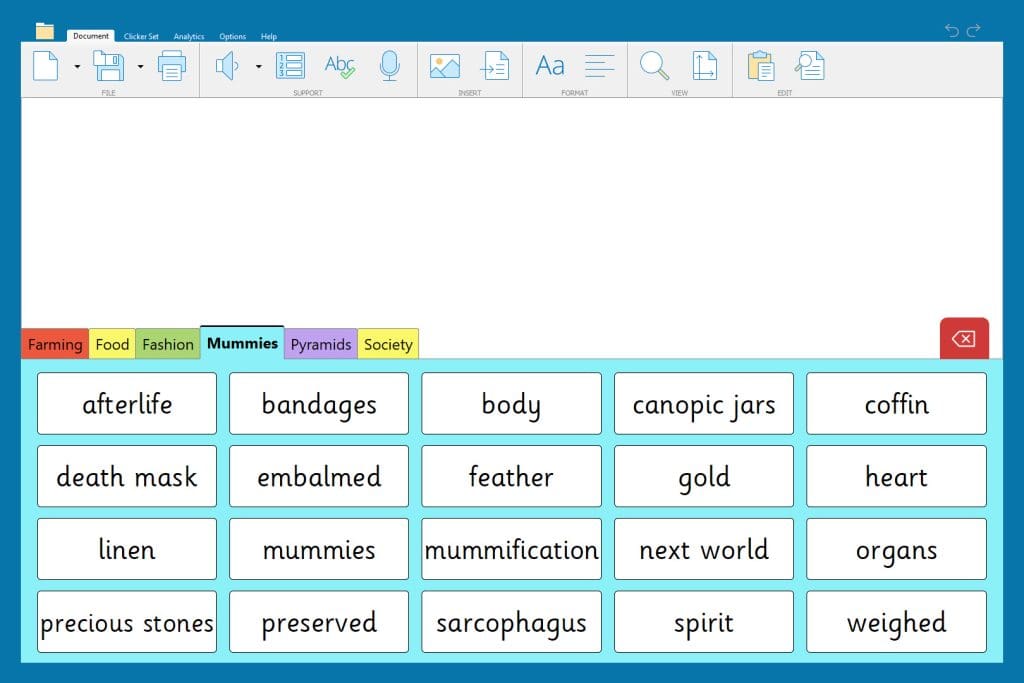
Cloze Documents and Word Banks work together brilliantly for vocabulary and key word checks.
- For the first activity, students fill in the blanks of the Cloze Document with the correct words to show their understanding of the vocabulary. Teachers can quickly see how the students performed with Cloze’s Analytics and correct any misconceptions.

- Next, teachers can reverse the process for a consolidation task by offering the vocabulary as a Word Bank which students can use to write definitions, put into sentences, or both!
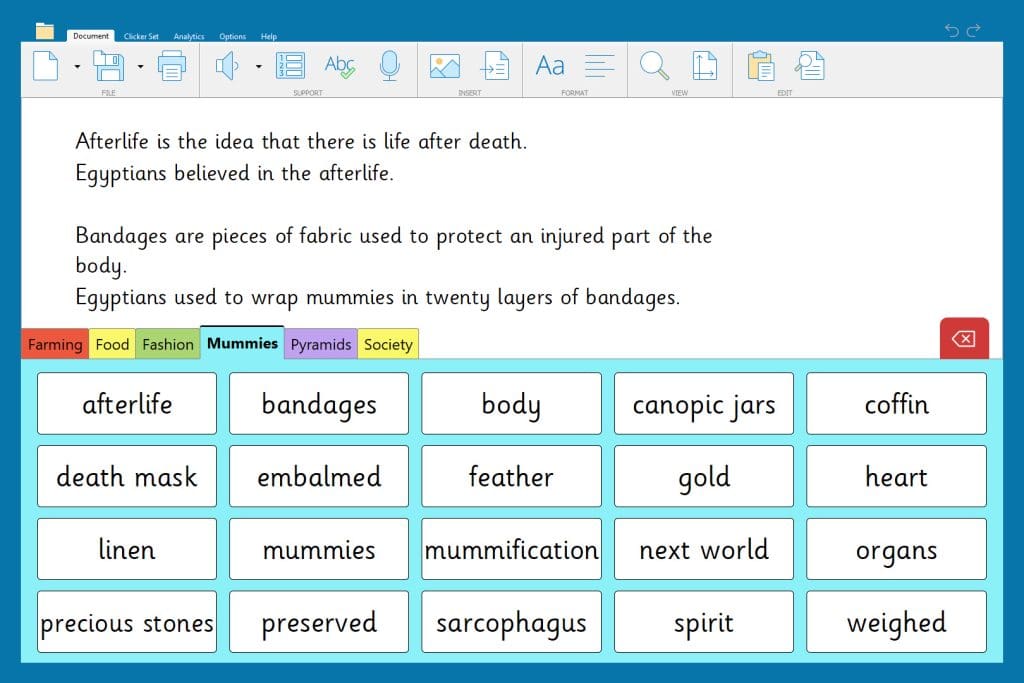
- Lastly, Matching Sets are a brilliant resource for students to revisit topic vocabulary and identify misconceptions independently.

Recalling information from a visual prompt
Clicker Books and Clicker Talk offer ways for students to engage with visual prompts whilst encouraging them to evidence their understanding in a method that suits them best.
- students can use Clicker Books to record their understanding of a topic using the word processor (including support from Clicker’s built-in Predictor and Spell Check), or they can use the Record & Play button to talk about what they know.
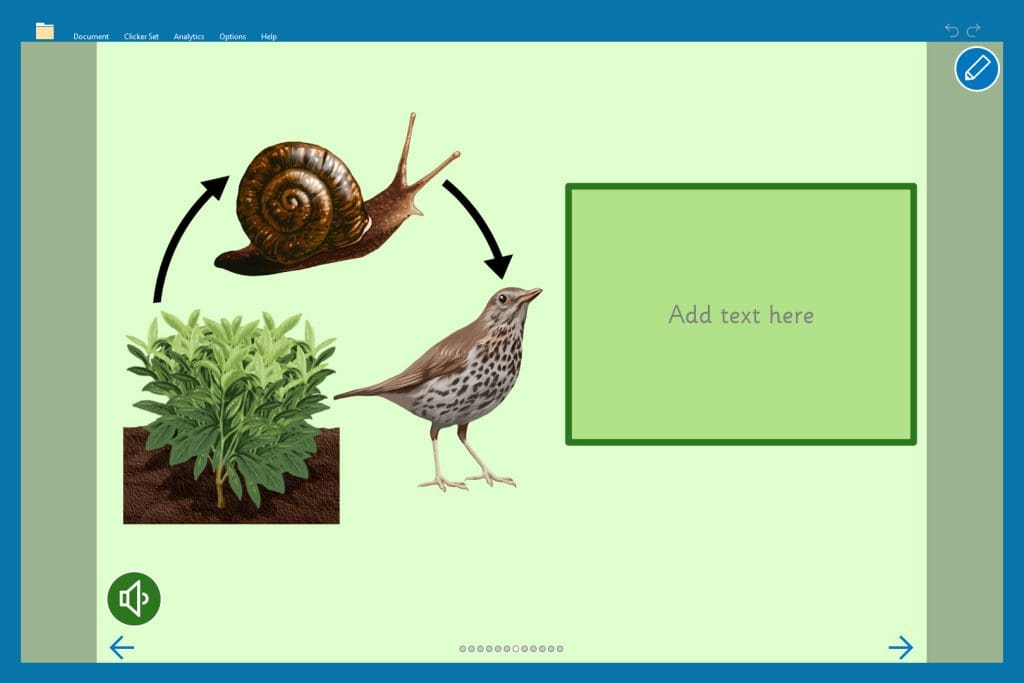

- Clicker Talk has fantastic resources for children to recall multiple pieces of information which they otherwise may have struggled to write down. This Talk Set encourages children to record up to six facts about a medieval village – which is also a handy way to collect speaking and listening evidence!

Interviews and hot seating
I used to love using interviews and hot seating to help my class think from different viewpoints - especially for characters from a story, someone from history or from the perspective of a professional (archaeologist, scientist, musician, etc.).
- You can quickly create your own hot seat or interview by using the Custom Set Interview Me, which children can use to capture their thoughts about the subject and consider what they know about them.
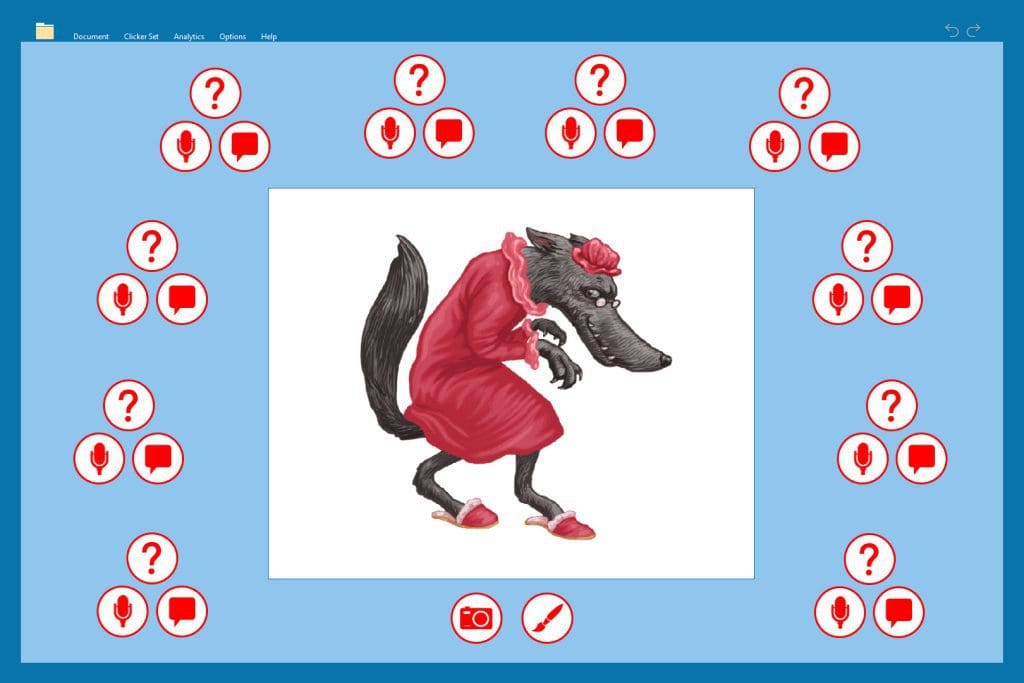
- If you’d like to create an interview task where the students have the option to write or record their response, then a Clicker Document with Voice Notes is always a great option.

For more information on how you can use Clicker and LearningGrids in your setting, you can:
- Watch our on-demand webinars
See how Clicker is used across a range of subjects and student groups. - Talk to an Education Consultant
Find out how Clicker can support your school’s teaching and learning priorities. - Email us
Our friendly team are happy to answer any of your questions.
Barb Lark is a retired speech and language pathologist and assistive technology specialist who is currently volunteering with the Special Education Technology Center (SETC) of Washington. Barb has been using Clicker for many years and recently shared her Clicker success story with us.
It all began when Barb was looking for an EdTech solution for students who had trouble with writing and language processing.
She needed to find assistive technology that was:
- easily customizable,
- allowed switch access, and
- built home and school connections.
“I was looking at our children with the greatest challenges. I wanted a way for them to be able to express themselves in writing. These are students with significant challenges in language, with cognitive challenges, and with physical challenges.”
After hearing about Clicker at a conference, Barb returned to the tech department to find that they had Clicker available to the district as part of a school technology ”bundle” they had already purchased! Barb and other district educators were excited about the broad access to Clicker and began its implementation.
“It’s a literacy tool that allows for immediate expression of ideas. It allows children to go from stock answers to broader self-expression. For students with learning challenges, it allowed access that they otherwise wouldn’t have had. It allowed them to access independent reading materials. It allowed them to express themselves in writing, in a way they otherwise wouldn’t have been able to do. We had it way before we had a lot of AAC (augmentative and alternative communication) systems available to kids, so it was a powerful tool for those kids to have a voice.”
Clicker had a wonderful impact on the students. Barb realized that if they provided the appropriate level of scaffolding within Clicker, students were eager to complete the work. Also, they were excited to bring their work home to share with their families. The students felt like they were a more integral part of their school community with this technology.
Clicker helped to create a fully inclusive environment and its impacts transcended the classroom. Everett School District still chooses to use Clicker today and makes sure it is available to all grades for their Life Skills classes.
If you’d like to discover how Clicker can empower your students, you can:
- Schedule a free consultation with us.
- Watch our free on-demand webinars to see Clicker in action.
If you follow our social channels, you’ll know that we love sharing schools’ Clicker successes. What’s so brilliant about our most recent examples is how varied they are.

Clicker’s writing support comes in different shapes and sizes. From word prediction to sentence structure support and everything in between, students are great at using the tools that suit their learning best!
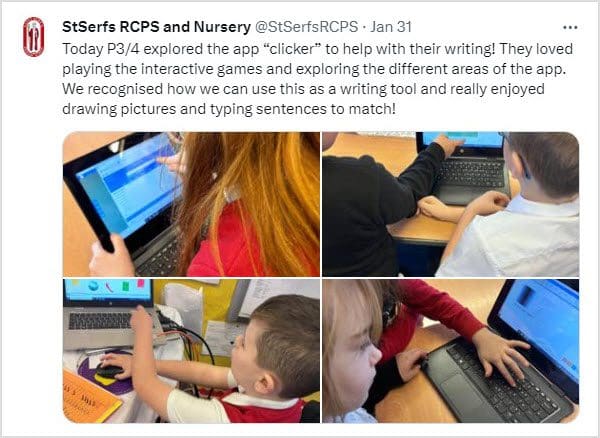
We love this idea – drawing pictures and writing matching sentences is a great way to get students to engage with their writing. Clicker also has a bank of images that students can insert into their documents in the CrickPix library if they’d prefer.
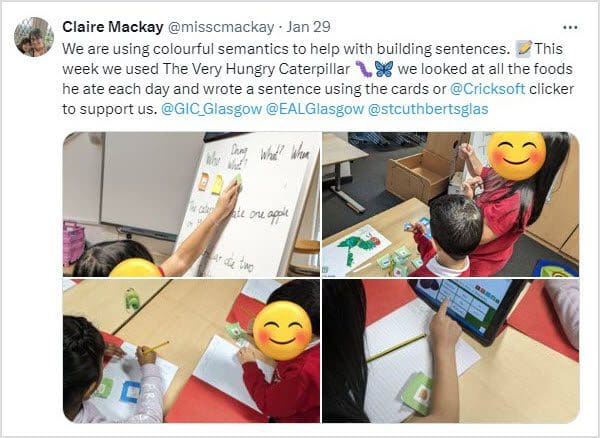
Using Clicker’s Connect Sets is a brilliant way to build students’ understanding of sentence structure – but you can also use colorful semantics within Clicker, too! We did a fantastic free webinar about it with Tom McDonald where he demonstrated how to build colorful semantics activities in Clicker. It’s still available on our website for you to watch today!

And lastly, using our wider curriculum resources from LearningGrids, this school have had fantastic fun writing and following their instructions for making paper aeroplanes!
If your school uses Clicker, please share your lessons and writing with us – we absolutely love to see what your students have been learning about.
Or, if you’ve seen something that’s inspired you to find out more about getting Clicker into your school, you can:
We’ve thoroughly enjoyed fundraising for KidsAid over the last two years and seeing the amazing difference the money has made. Our donations have mainly been used to refurnish and supply resources for their therapy rooms, which are a crucial part of the support they offer children and their families near our UK office in Northampton.
We are thrilled to share that the final figure from our fundraising is a whopping £6,398.30 (over $8,000)!
Here’s a little look back at some of the fundraising efforts our team made and the fantastic transformation of KidsAid’s therapy rooms:


BEFORE
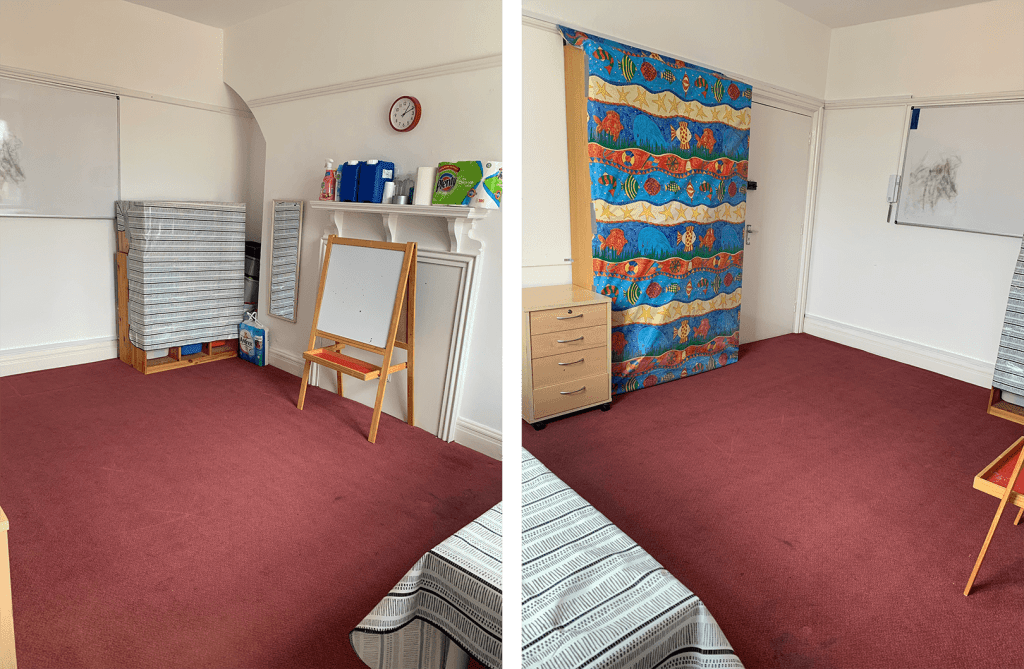
AFTER

It’s been awesome watching the transformation of their therapy rooms, and learning about the wonderful support they provide for families and young people within Northamptonshire. If you’d like to find out more about their amazing work, you can visit their website.
We love that our Clicker success stories highlight how the software can transform learning for entire cohorts of students. Often educators are trying to find a solution for a particular group of students who are struggling with writing, but when Clicker is introduced, they realize the benefits it offers to all learners.
Rose Racicot is an occupational therapist and assistive technology specialist. Recently retired from roles at Kent and Bellevue School Districts, Rose continues to work part-time for the Special Education Technology Center (SETC) at Central Washington University. Over her career, Rose has embraced the universal benefits of Clicker and has shared her fantastic successes with us.
Rose was frequently receiving referrals for students who were frustrated, discouraged, and exhibited behavioral challenges in the classroom. She believed these behaviors were often the result of an inability to express themselves or effectively communicate.
Rose was looking for a learning tool that would help the entire class (not just a single student) to:
- overcome their writing barriers,
- remove obstacles hindering self-expression, and
- promote their independence in the classroom.
After being introduced to Clicker by a general education tech specialist, Rose realized that it was the assistive technology she needed. It would give students the freedom to select the supports they wanted and increase their independence and confidence in the classroom.
“I knew it would help meet learning goals because if you had content you wanted the whole class to access, you could create supports at different levels and introduce it to everyone. Clicker gives you a vehicle to differentiate the same content for all students very quickly and easily.”
The impact of Clicker was incredible! Rose found that through the consistent use of Clicker, students were able to complete class assignments that they would have struggled with in the past.
With Clicker’s built-in accessibility, students who previously had difficulty focusing on a writing task were now regularly spending 30 minutes on their writing activities. The use of Clicker:
- boosted student motivation,
- improved their self-confidence, and
- increased inclusivity by eliminating the need to separate students with special needs from the general education classroom.
If you’d like to learn more about how Clicker can help your students access their learning and increase their independence as writers, you can:
- Read the rest of Rose’s success story.
- Watch our free on-demand webinars to see Clicker in action.
- Schedule a free consultation with our Clicker experts.
At the start of every year, we take a company-wide vote to decide which of the many worthy organizations will be the Crick Software “charity of the year.” We then spend the next 12 months taking part in various activities to raise as much money for them as we can!
This year, the team’s clear winner was The Lowdown – a mental health charity supporting young people near our UK office.
Why The Lowdown?
The Lowdown provides free and confidential support services for 11- 25-year-olds in Northamptonshire, UK and believes that no young person should ever experience mental health issues alone. They offer a caring environment where young people are always supported on their journey towards positive emotional health and well-being.
Their work
The Lowdown works with young people to provide accessible, safe, welcoming, confidential, and nonjudgmental services including:
- Counseling
- Information, Advice & Advocacy
- Well-being
- LGBTQ+ Support
- Youth Groups
- Sexual Health
Last year, over 2,000 young people were supported by the charity!
Where we come in
We have lots of fun activities planned, including bake sales and sponsored challenges, to ensure that 2024 is our most successful fundraising year ever. As always, we’ll keep you updated through our Facebook and X channels.
If you’d like to find out more about The Lowdown or support the vital work that they do, you can visit their website here.
New this month, DocsPlus users can now join our DocsPlus Community Facebook Group.
This group is for individuals, parents, and professionals who use DocsPlus – our award-winning writing tool for middle and high schools. In this group we will share regular DocsPlus updates, tips, resources, and useful information about the software. These will include:
- New LearningGrids resources
- Upcoming training webinars
- Top tips, how-tos, and informative guides
- Software updates
We also encourage group members to come together and ask questions, share any DocsPlus wins, and learn from each other’s successes with the software!
So, if you’re a DocsPlus user, it’s time to join our DocsPlus Community Facebook Group.
We look forward to seeing you there!
As 2023 draws to a close, it’s the perfect opportunity to reflect on some of the Clicker successes we’ve celebrated this year. One of which came from Rebecca Hammonds, writing coordinator and 4th grade teacher at St. Catherine’s Academy in the UK.
St. Catherine’s started its Clicker journey back in 2022 as part of a Laurel Trust funded project, looking at how assistive technology can support learners to record their ideas. The evidence they collected was overwhelmingly positive, and, as a result, Clicker was rolled out as a school-wide approach to learning support.
Since its initial implementation at St. Catherine’s Academy, Clicker continues to improve student confidence and enjoyment in writing across the whole school, for all student groups.
Rebecca shared with us many examples of how Clicker has transformed the teaching and learning at St. Catherine’s Academy, including:
Offering flexible support
“We love the flexibility Clicker offers our school in terms of student support… we have embedded Clicker in whole class teaching, as well as small groups and support for students with high needs. Our learning support and use of Clicker is traveling through word of mouth and our successes are inspiring other schools to come and see it for themselves…”
Building resilience
“The children are really resilient learners with Clicker. We’ve noticed that very quickly the children are becoming familiar with the software and know how the features help them when they write. As a result, we’re seeing a huge improvement in their independence as writers… Our 3rd grade teacher has noticed the improvement in the quality of writing that her class produce because they’re enjoying the writing process much more with Clicker and relying less on adult support…”
Improving learning outcomes
“In general, Clicker has improved the quantity of writing our students can produce in the given time frame. They feel supported for much more of the lesson because of Clicker’s support features, and the quality of what they write has improved too.”
Optimising teacher time during class
“The most noticeable benefit of Clicker is that it has given us so much more time within the classroom. Clicker gives us the flexibility of being able to support more children in one given session, as opposed to maybe the one or two children who require a lot more of your time and support. All the teachers that I’ve spoken to agree that Clicker improves student independence in lessons, and the direct impact of that is teachers gain “independence” too as they aren’t sitting beside the same children throughout an entire lesson…”
Increasing student independence
“We see far fewer children sitting there and not putting pen to paper for half a lesson or sitting there with their hand up constantly. It makes perfect sense that by increasing student independence, the teachers benefit too!”
To close this success story reflection, here are some words from the students themselves, who absolutely love using Clicker!
“It’s really helpful and when I can’t always have my teacher, Clicker is like my teacher. I love that it reads my work back.”
“I was struggling with writing, but Clicker makes my writing clearer. I can now read my work back so I can make the edits I need to.”
How do you collect your students’ prior knowledge?
When I was teaching students, I know I found it challenging to find an effective solution. At times I found myself relying on successfully filing away hundreds of sticky notes, or I felt like I was endlessly modelling how to draw a spider diagram neatly and accurately…
Thankfully, Clicker Board is the perfect solution to this problem – but goes one step further by helping you to accurately record and track knowledge throughout the whole topic!
Collecting prior knowledge:

The initial benefit of using Clicker Board to collect students’ prior knowledge is that it can easily be a whole class activity, or an independent activity.
If it is an independent activity, using Clicker Board makes it accessible to all learners. Clicker Board provides built-in writing support with intuitive word prediction, spell checker and speech feedback, helping students to write down their ideas with growing independence. students can also use Voice Notes and images, which gives less confident writers an alternative way to demonstrate their prior knowledge.
What’s more, you can easily print Clicker Boards to stick into topic/curriculum books if you wish! Creating a Clicker Board is a more accessible way for many children to demonstrate their knowledge accurately, and neatly, than the alternative of a hand-drawn spider diagram (or collecting lots of sticky notes!)
Continuing to collect knowledge
Clicker Board allows you to have multiple boards collated in one place by utilising ‘tabs’. These make it incredibly straightforward for learners to track their knowledge every lesson. In the images below, you can see that I’ve created tabs for different sessions, from ‘Prior Knowledge’ through to ‘Lesson 3’.
It’s a great way for students to ‘collect as they go’ or you can use it as a plenary at the end of the lesson to check how much they can remember/what they have learnt.
One idea is to have a knowledge question in the middle of the Clicker Board that children aim to add their answers to throughout the lesson. This could even be two or three focused questions that the children can collect the answers to.
Again, students can choose whether they type or use Voice Notes to record their knowledge.
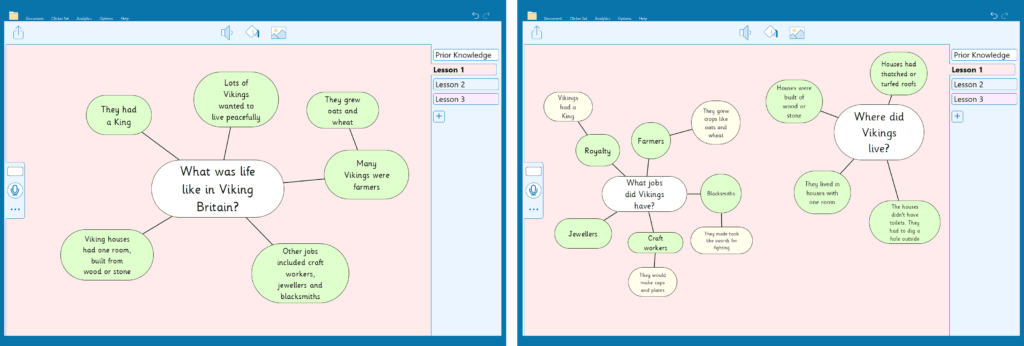
Don’t forget, LearningGrids will often have pre-made Clicker Boards that you can use for your initial prior knowledge session, which you can simply add extra tabs to as the topic progresses!
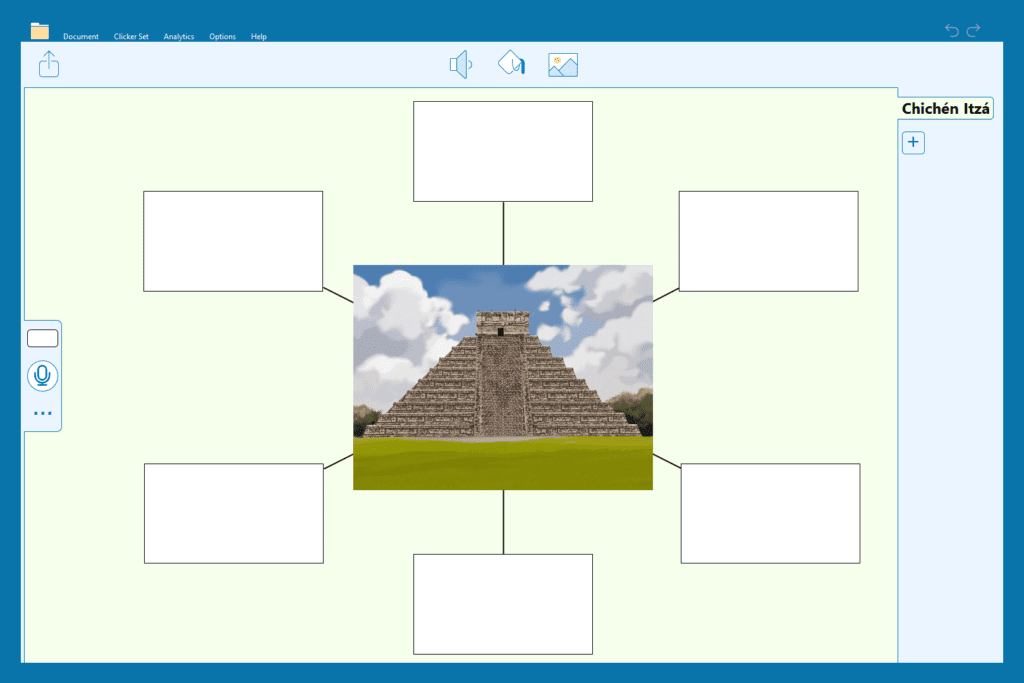
If you have any queries about utilising Clicker Board in your topic lessons, please contact us at usinfo@cricksoft.com. Or you can:
- Visit our Clicker Board training resources
- Book a customer care meeting if you’re a current subscriber
- Book a consultation if you’d like to explore getting Clicker into your school
If you’re using DocsPlus on iPads or Chromebooks, we have some excellent news for you!
Previously, our intuitive planning tool WorkSpace was only available to Windows/Mac users, but now it is also built into our DocsPlus App.
WorkSpace is an incredible tool that your students can now carry with them. They can create mind maps and storyboards with words, pictures and voice recordings for any subject, in any classroom!
All of DocsPlus' support features are available within WorkSpace. Students can listen to their text with the speech tool, use the word Predictor to help find the right word and correct any spelling errors with the help of the talking spell checker.
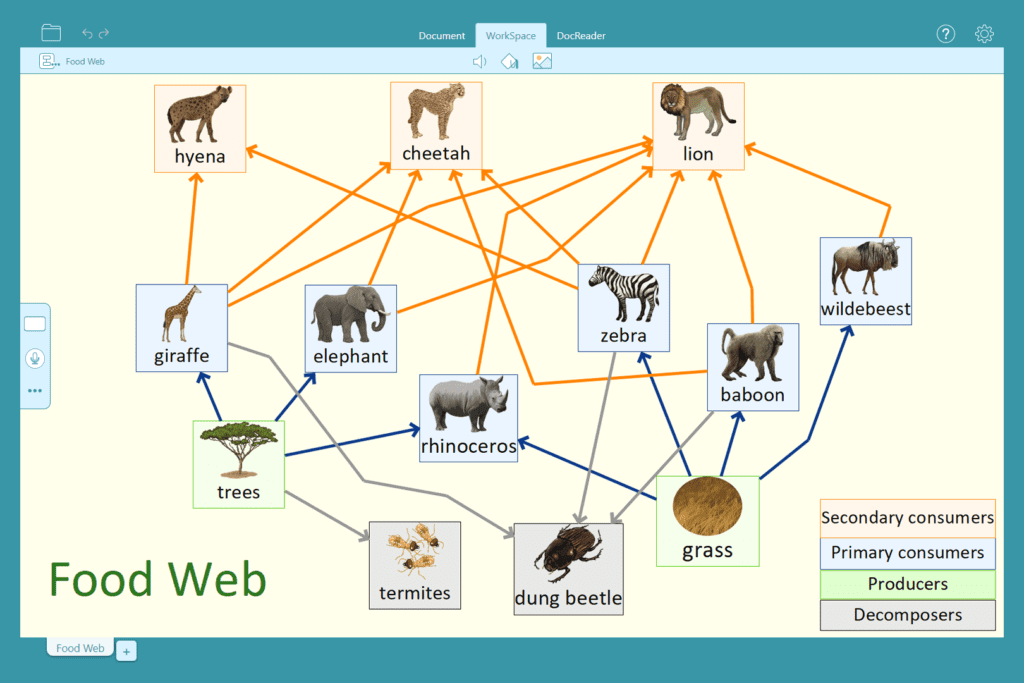
When your students are ready to write, they can send their WorkSpace mind map to a DocsPlus document in a format that suits their writing task and learning style. They can send it as a diagram, an essay outline, or even transform their mind map into a useful Wordbar!
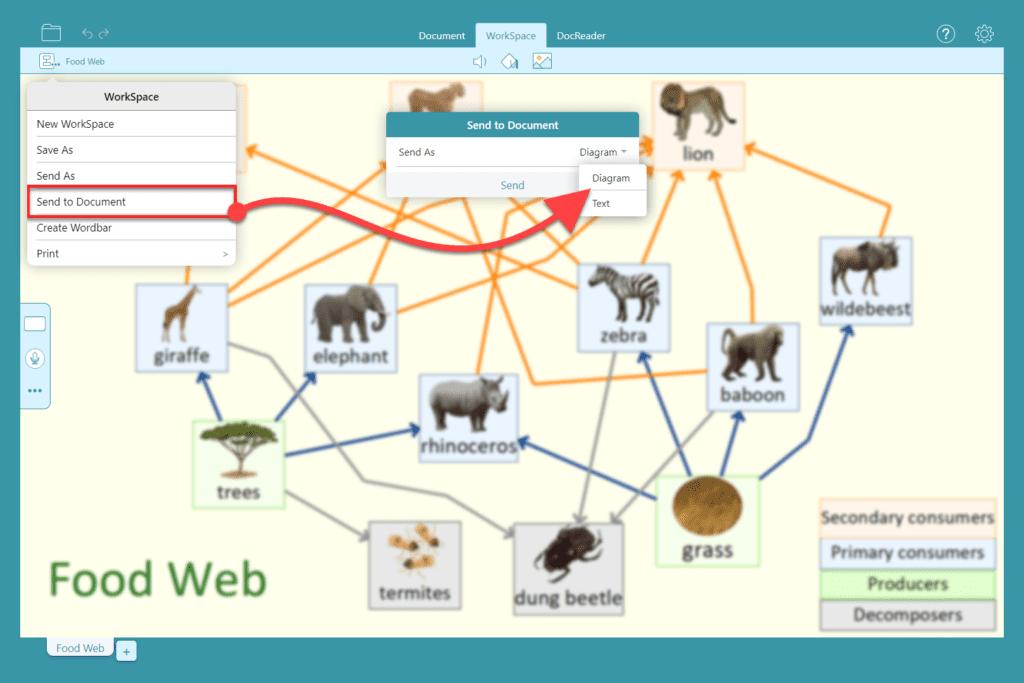
Free access for current subscribers
WorkSpace is available now in our DocsPlus App for all our current DocsPlus subscribers – simply update DocsPlus on your device(s) and WorkSpace will be available for your students.
If you require any further guidance, our support team will be happy to help.
(For a quick recap on how to use WorkSpace, you can watch our handy video demonstration here.)
Don’t have DocsPlus yet?
If you would like to explore how DocsPlus can help your struggling students tackle secondary school writing tasks with confidence, we offer free 15-minute consultations where we’ll discuss your students’ specific learning challenges and how DocsPlus can support them.
You can choose the date and time that works best for you here.
We’ve also got lots more information about our DocsPlus App and the complete DocsPlus package on our website.
Earlier this year we were thrilled to welcome Rachel Lawson, Deputy Head at Lansdowne Primary School, to share her trust’s Clicker success story with us as the focus of a free webinar.
Since we met with Rachel, the Stour Academy Trust has received some wonderful news! They have been nominated for 2 National MAT awards (including the Innovation Award for ‘outstanding use of technology and digital adoption/transformation’), and Lansdowne Primary has received a glowing Ofsted report in their recent inspection, where it was praised for its use of technology and its ‘significant and positive impact on students’ learning’.
During Rachel’s webinar with us, she explained her instrumental role in implementing Clicker across the trust as part of their 1-1 iPad program. As a result, Rachel has seen a significant boost in writing attainment and confidence during this time. The Stour Academy’s success story is a brilliant example of how Clicker can be utilised across numerous schools to benefit students and staff.
Why did Rachel choose Clicker?
When Rachel first moved to Lansdowne Primary School, she recognized that her class displayed a vast range of abilities and barriers towards writing independently. The writing gap in upper KS2 was widening at a rapid pace and children were below their age-related expectations.
“We put a range of strategies in place to try and improve writing, but nothing seemed to work. I had used Clicker in my previous school… I knew that Clicker could be differentiated easily and would increase the standard of independence in writing - I was excited to see the impact it would have!
Over time, we saw huge, positive effects on the quality and independence of our struggling writers”
What made the trust implement Clicker more widely?
After seeing incredible results from implementing Clicker to support her Year 5 and 6 students, Rachel sought an objective opinion on how she was using Clicker in her lessons from local specialist teachers. It was a success! Consequently, the trust’s CEO implemented Clicker across every school in the trust…
“We rolled Clicker out across our 8 schools!
One of the biggest successes that the use of Clicker had evidenced was that it allowed teachers to see and capture moments of a child demonstrating their true ability, which often would be missed by the use of just pen and paper.”
What impact has Clicker had on student progress?
Rachel moderated the use of Clicker closely, including comparing lessons where Clicker was used, with those where it was not. She analysed data such as the amount of time taken for a child to complete a task, as well as their level of independence throughout. Rachel also reviewed examples of children’s work produced with and without Clicker…
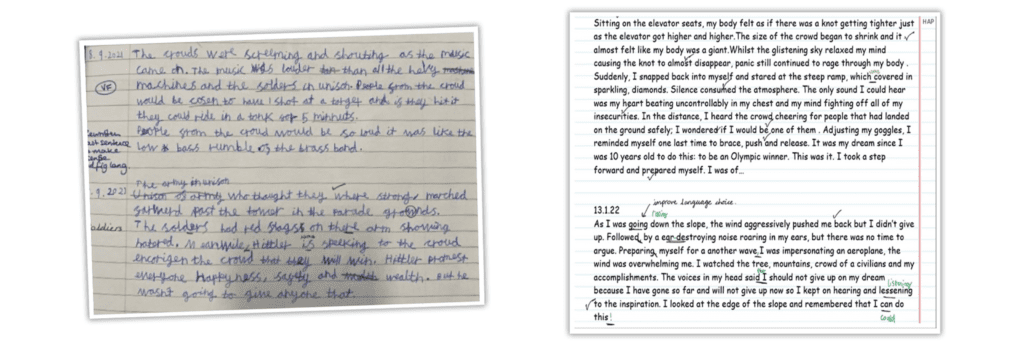
“Over the course of 4 months, we used Clicker to vary [a child’s literacy] support, and target his specific learning needs. As a result of this bespoke targeted support, we saw a drastic improvement in his writing (right picture). As the quality and independence improved, we were able to remove elements of support to further promote and extend his writing independence and confidence. Using Clicker progressed and accelerated his writing outcomes more than could have been possible with a class of 30.”
What feedback has the trust received since using Clicker?
The Stour Academy Trust‘s fantastic implementation of Clicker has led to wonderful results for their learners…
“Since using Clicker, our students believe that they can succeed in writing – their overall outcomes and progress has accelerated, and we have had successful internal and district moderations whilst using the program. Our feedback from external professionals have reinforced that Clicker is an inclusive tool and one that has truly supported our children’s writing and overall independence.”
Want to know more?
- Read the Stour Academy Trust’s full success story
- Watch Rachel’s webinar “Our Clicker success story - Stour Academy”
- Speak to our Education Consultants about introducing Clicker to your setting
We’ve got another exciting development to share with you this week…
Previously, the Clicker Board feature was only available to Windows/Mac users.
Clicker Board is an incredible planning tool that helps students prepare for writing. students can add text, images, and sounds to their planning whilst accessing all of Clicker’s support features including realistic speech feedback, word prediction and a talking spell checker.
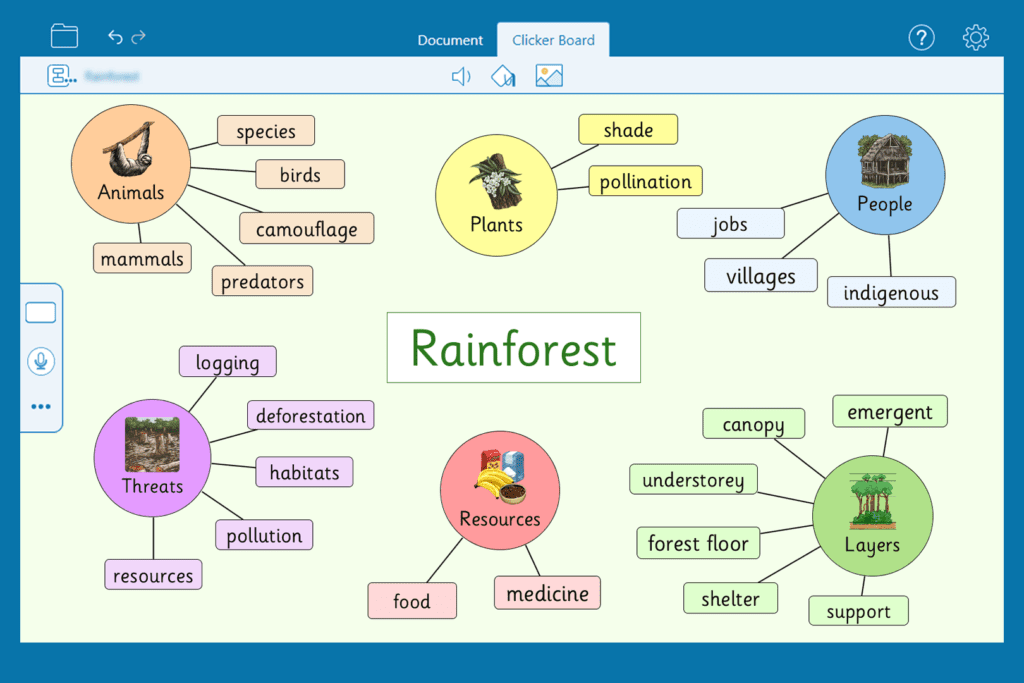
Clicker Board now provides Clicker Writer users with many intuitive features that make planning an accessible task for all students, including:
Visual and audio support

Clicker Board utilises text, image and sound to ensure that every learner can plan their work in the way that suits them best. Images can be chosen from over 4500 curriculum pictures in the CrickPix library, or users can create their own using the painting tools. For strong verbal communicators, Voice Notes can be added to Clicker Boards to ensure they can capture their ideas, too.
Plans transform into structured writing support
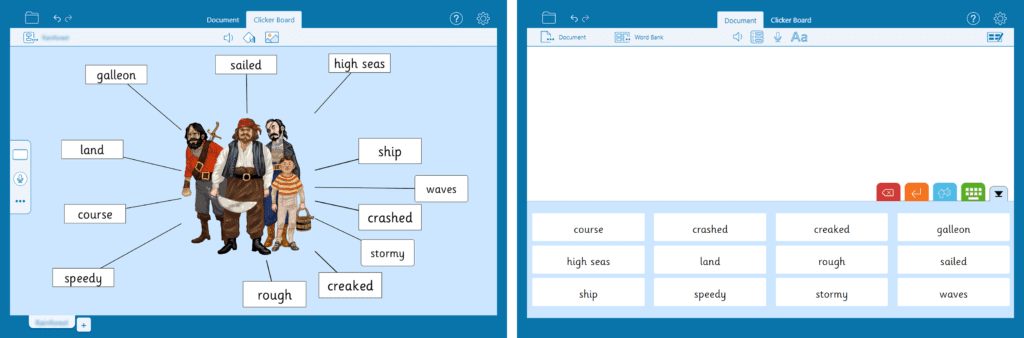
When your students have completed their board, they can transform it into a word or picture bank that will sit at the bottom of the document as they are writing, providing instant touch access to key words, phrases and/or images. The bank intuitively mimics the structure of their board – which helps students to organise their written paragraphs and transfer their ideas to the page in a logical order.
Click here for a quick video demonstration!
Clicker’s integrated support features

All of Clicker’s support features are available while students create their Clicker Board. They can listen back to their text with the speech tool, use the predictor tool to help find the right word, and correct any spelling errors with the help of the talking spell checker.
Free access for current subscribers
Clicker Board is available now in Clicker Writer for all our current Clicker subscribers – simply update Clicker on your device(s) and Clicker Board will be ready to go!
If you require any further guidance, our support team will be happy to help.
Don’t have Clicker yet?
If you would like to explore how Clicker can raise literacy attainment and enjoyment across your school, we offer free 15-minute consultations where we’ll discuss your students’ specific learning challenges and objectives, and how Clicker can help.
You can choose the date and time that works best for you here.
We’ve also got lots more information about the complete Clicker package on our website.
It’s a new year and a new term, which means that most schools will have recently carried out end-of-term assessments for teachers to gain a summative insight into how the needs of their class have changed over the first term. Subsequently, many will have identified children who require extra support to keep them, or get them, on track.
When looking at writing outcomes, teachers often consider the same questions to identify whether their students would benefit from attending writing intervention groups…
- Do they write sentences that ”don’t make sense” and read aloud work that is different from what they have written?
- Do they find it difficult to spot a mistake in their writing and know how to correct it?
- Do they struggle to write cohesive ideas or extend them beyond simple sentences?
- Is their spelling below the age-expected standard or is their vocabulary limited and impacting their progress?
Clicker’s intuitive word processor, including Spell Checker, Predictor, Voice Notes, Word Banks and Writing Grids, is an excellent tool that your students can use to transform their daily writing challenges into achievable targets.
Here I’m going to break down how Clicker supports children as they develop these writing skills. I will provide detailed explanations and examples to show how Clicker is a fantastic resource for supporting intervention groups:
Do they write sentences that ‘don’t make sense’ and read aloud work that is different from what they have written?
This is where Clicker is an invaluable tool for students who struggle to check their work for sense. Its realistic speech feedback can be accessed at any time by students as they write, edit, or check their work. It is initiated by clicking a word, highlighting a phrase or sentence, and pressing the speaker icon, and every time a student inserts a period as they write.
I have endlessly repeated in the classroom, “Check your work as you write… don’t wait until the end to check that your sentences make sense… I should be able to hear you reading your writing aloud… Use your finger to make sure you’ve written what you meant to write…”
Alas... I could probably count on one hand the number of children who would actually do this every lesson, for every piece of writing.
There are several reasons why my students struggled to follow my advice as closely as I’d hoped:
- They’d forget – it happens to the best of us!
- They were too embarrassed to read their work aloud
- They thought reading with their finger was for ‘younger children’
- They didn’t want to find a mistake as correcting it would have a knock-on effect with the layout/presentation of their writing
Having access to Clicker removes all these hurdles.
- Clicker’s speech feedback enables students to check each sentence as they write it, because this automatically occurs when they insert a period. They don’t need to remember to check!
- They don’t have to be embarrassed about reading their work aloud as it reads their work for them. It also encourages accurate punctuation, as if a child hasn’t ‘heard’ their sentences for a while, it means they haven’t been using periods!
- Clicker highlights the text in red as it reads back, so children have the benefit of word-by-word reading, without having to use their finger to follow the text.
- Furthermore, allowing children to practise writing with a word processor makes editing and checking work an easier, more enjoyable process as it doesn’t have a knock-on effect to the layout of the rest of the work.
Are they able to spot a mistake in their writing and know how to correct it?

Here is a piece of writing from a child who was inspired by The Lion, The Witch and The Wardrobe.
How does Clicker help a child spot their mistakes?
Before using Clicker, a child may read this writing as they intend it to sound, and therefore miss spelling mistakes or missing words. When using Clicker, most spelling mistakes are indicated by the red line, whilst others are words that are spelt correctly, but used incorrectly. This is where Clicker’s speech feedback will be incredibly useful as it will pronounce the word that has been written, as opposed to the word that is intended.
Working through the spellings, children can access Clicker’s Spell Check to help identify the correct spelling.

By right clicking each word, the child can listen to the suggestions and see if their intended word is in the list.
The words can be left clicked and chosen, automatically inserted in the sentence, and then the full sentence is read back to the child for a final check.

If the word is not suggested in spell check, a child may be able to decipher part of the spelling error by listening to their word aloud. However, some children may listen to a word like ‘frighten’ and select it because it sounds very similar to their intended word. Clicker Analytics is perfect for moments like this because it highlights changed words and provides details into how the alternative word was chosen. We can see that the child initially put the ‘d’ sound on the end of their attempt ‘fritnd’ and chose a more accurate alternative spelling with ‘frighten’. However, this word is in the wrong tense. This identifies a next step for this child of listening for ‘ed’ sounds on the end of past tense verbs, but also encourages more accurate spelling with the correct trigraph for the ‘igh’ sound in ‘frightened’.

For children who have habitual spelling mistakes, Clicker has an option for teachers to add this to their predictor’s word pool through the document’s options.

By adding the ‘sumfing’ spelling and ‘something’ as the correction, this will now be part of the child’s spell check moving forwards!

The final spelling corrections the child needs to identify is words that are spelt incorrectly for this context. For instance, the word ‘saw’ is spelt as ‘sow’. The child will be able to identify this by listening back to their sentence with Clicker’s realistic speech feedback and select the correct word with support from Clicker’s word predictor.
The child may identify that the diagraph at the end of the word is producing the wrong sound and attempt to change the spelling with ‘sor’. In this instance, it would then provide a red line and the child can select ‘saw’ as the correct spelling after listening to the word with a right click.

If the child does not make this phonetic connection, this could identify the need to revisit the ‘or’ and ‘ow’ sounds with some extra phonics practise! Using Clicker can highlight a misconception in a child’s phonetic understanding that handwritten work alone may not identify.
The same tools and strategies can be applied to the second sentence until the child reaches the missing word ‘and’ between ‘wardrobe’ and ‘gasped’. This will be identified by the child hearing the sentence back and noticing the missing word. If they do not identify the missing word, it instead identifies a teaching point for this child.
A brilliant tool to then implement would be a Cloze document that encourages this child to select the correct conjunction to join simple ideas. This could then be used for the next intervention session!

Lastly, I have turned off the ‘automatic capitalisation after periods’ setting to ensure that I could fully understand each child’s writing process. As students do require 1:1 teacher support at some point during intervention groups, this may be the perfect opportunity for teachers to focus on this misconception. The child can then listen back to their work, identify the periods, and add the capital letter to the subsequent word.
Are they struggling to write cohesive ideas or extend them beyond simple sentences?
Clicker can help students develop their ability to write cohesive ideas through practice with Sentence Sets and Cloze activities.
Sentence Sets are a brilliant tool because they can easily be pitched to meet the needs of the student.
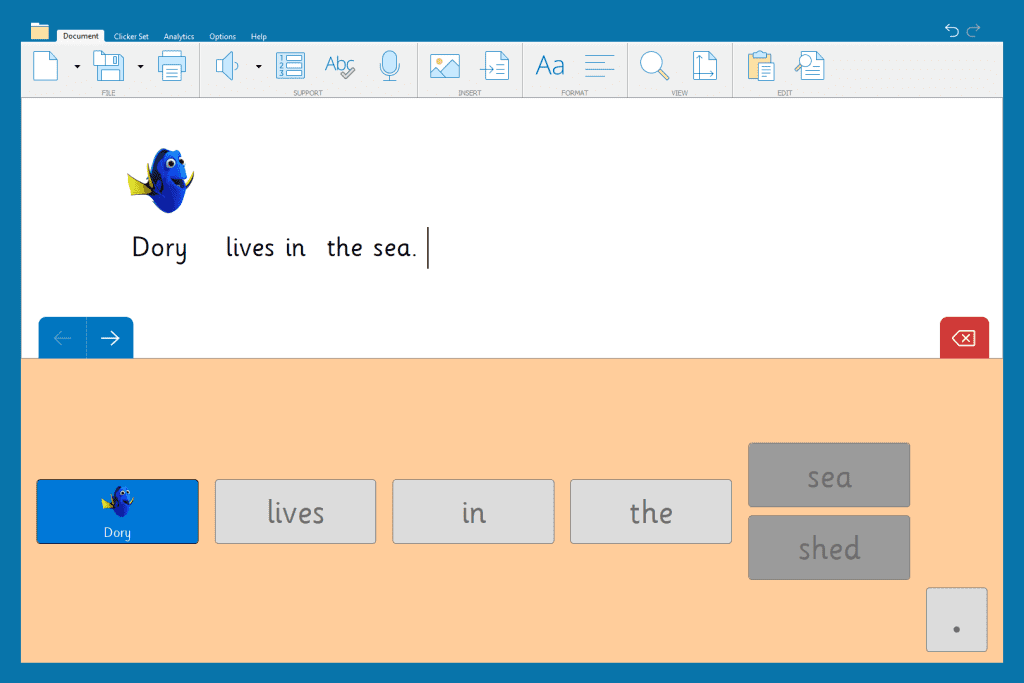
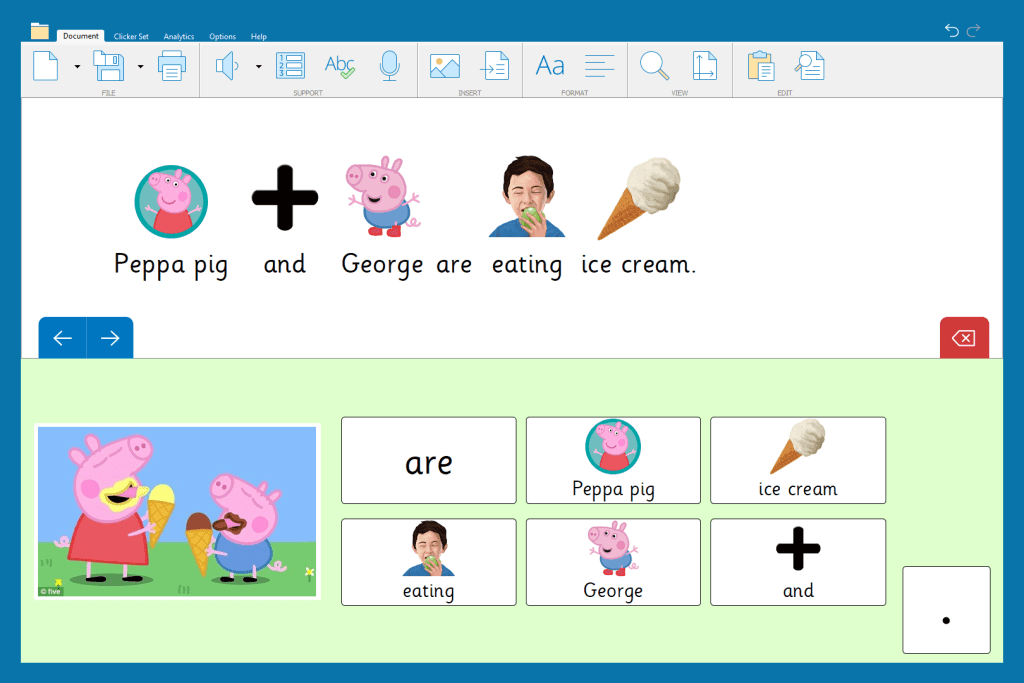
For instance, a child who needs support writing simple sentences with correct word order and sense would benefit from practising with a Sentence Set like:

Including basic word classifications to encourage good sentence structure and understanding is a brilliant starting point for this type of writing intervention – and quickly builds confidence for the child.
Sentence Sets can be presented to the student in 4 different forms:
- Alphabetical – words are listed in alphabetical order
- Random – words are listed in a random order
- Sentence Order – words are presented in the correct order
- Guided Order – words are presented in the correct order and are only available to select in the correct order
Having the option to change the word order ensures that children can get the precise intervention they need for their current writing ability. Sentence Sets can also be made more complex by introducing other word categories like adjectives and adverbs to the sentences.
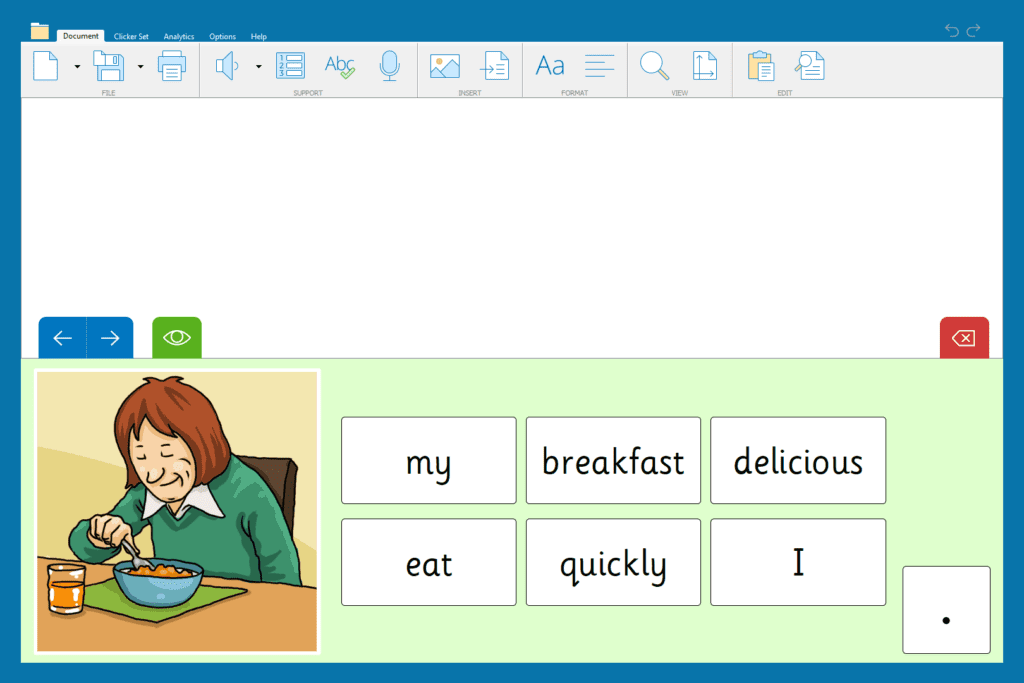
When children are confidently writing Sentence Sets in the correct order, you can utilise Clicker’s Cloze activities. These are great for consolidating knowledge whilst allowing children to show some creativity.

Is their spelling below age expected standard or is their vocabulary limited and impacting their progress?
Spelling and vocabulary can be a challenge for students for many reasons. Luckily, Clicker’s built-in tools can help students feel successful with words and build their confidence.
The first feature that would be great to utilise in a writing intervention group is Clicker’s Word Banks.
Word Banks can be downloaded with ease from LearningGrids or can be made by teachers to provide customized vocabulary banks.


Using Word Banks gives students the access to correctly spelt vocabulary, whilst reducing their cognitive load.
It is typical for teachers to provide spellings, genre-specific word lists etc. during a writing task – but this still requires the students to copy them accurately (often having to look back at the word multiple times) and can be a demoralising task for students if they need to do it frequently. It also slows down their writing pace, which can interfere with their thought process and their intended sentence content.
Intervention groups are as much about building confidence and helping children to feel successful in their writing as they are about filling gaps, correcting misconceptions and developing skills. Word Banks are a great way to introduce new vocabulary, or even for students to access age-expected vocabulary as they write.
Clicker’s intuitive predictor and spell checker are fantastic tools to help students identify spelling mistakes with independence and gives them the opportunity to correct them before showing their work to their teacher.
Using Clicker to provide these interventions helps the teacher track their progress too – particularly with elements like spelling and vocabulary selection. With pen and paper, it is difficult to identify ‘how’ a child chose that spelling – whether they had looked it up in a dictionary, a given prompt-sheet or if they know how to spell the word independently.
Using Clicker Analytics enables teachers to understand how words were spelt/selected as it shows:
- Words that are typed
- Words that are corrected using the spell checker – and if those words were listened to before being selected
- Words that were inserted via the predictor
- Words that were chosen from a word bank

If you have any questions about how else you can utilise Clicker to support your students’ writing progress, please get in touch at usinfo@cricksoft.com.