Table of contents
If you use Clicker to support learning in your classroom, you already know how powerful it can be for encouraging writing, boosting confidence, and giving every student a voice. But like any robust tool, sometimes you just need a quick walkthrough, a visual example, or a friendly guide to help you use it to its fullest.
That’s exactly why I created Clicker Corner - a series of short, practical videos designed to help educators feel confident and fully supported when using Clicker with students.
What is Clicker Corner?
Clicker Corner is a growing library of quick, easy-to-follow videos that show you how to make the most of Clicker.
Each video focuses on a specific feature, strategy, or practical use for the classroom.
Whether you're brand new to Clicker or you’ve been using it for years, Clicker Corner gives you clear, approachable guidance you can apply immediately.
Think of it as your go-to spot for:
- Step-by-step guidance on key features
- Practical examples of how to use Clicker with students
- Tips and tricks you may not have discovered yet
- Inspiration for integrating Clicker into everyday lessons
Who are these videos for?
- Teachers who want to get more comfortable with Clicker
- Special educators and interventionists looking for accessible tools
- Technology specialists supporting staff
- Anyone who wants practical, classroom-ready ideas
Whether you're differentiating instruction, creating personalized writing supports, or helping students bridge from supported to independent writing, you’ll find something helpful inside Clicker Corner.
Start exploring Clicker Corner today
If you haven’t watched the Clicker Corner videos yet, now’s the perfect time to jump in. Each one is designed to make your life easier and your students’ learning stronger.
Using Clicker to build ELL literacy proficiency
Use Clicker to improve ELL students’ ELA foundational skills and oral communication.
Predictable chart writing with Clicker
Predictable chart writing is a collaborative learning activity where a group of students share the writing experience. Clicker makes predictable chart writing more accessible to all learners.
Supporting students with pictures in Clicker
Clicker offers a variety of picture support options including our popular Picturize tool that adds images instantly to the Document and Clicker Sets!
Explore more Clicker Corner videos here!
Traditional stories are an important aspect of literacy for young children. They are diverse in culture, rich in language and structure, and often contain moral lessons and themes. These stories provide children with opportunities to analyze story elements, develop critical thinking skills and discuss character development.
Here are just some of our fantastic resources from LearningGrids’ Story Corner that you can use to support your students as they explore traditional stories.
1. Clicker Books
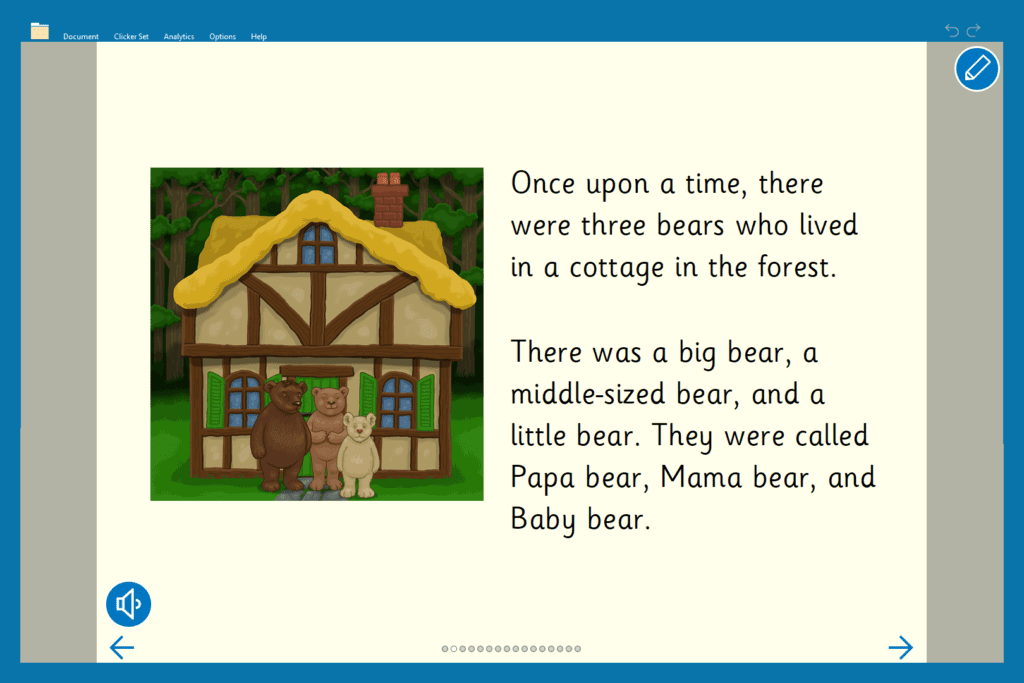
Introduce a traditional story such as, Goldilocks and the Three Bears, using Clicker Books - Read a Book. These are perfect for reading aloud to your whole class or for individual students to listen to the story using the speech feedback tool. The text follows the familiar fairy tale structure and is a great starting point for discussing story elements and character development.
2. Clicker Boards

Clicker Boards are an easy-to-use mind mapping tool for students to gather and plan out ideas. These can be used by individual children and small groups or to promote discussion with the whole class. Traditional stories have strong characters that can grow and change. These characters can prompt students to think more deeply about their traits, choices, and challenges. Students can quickly and easily add text and an audio recording to the Clicker Board.
3. Connect Sets
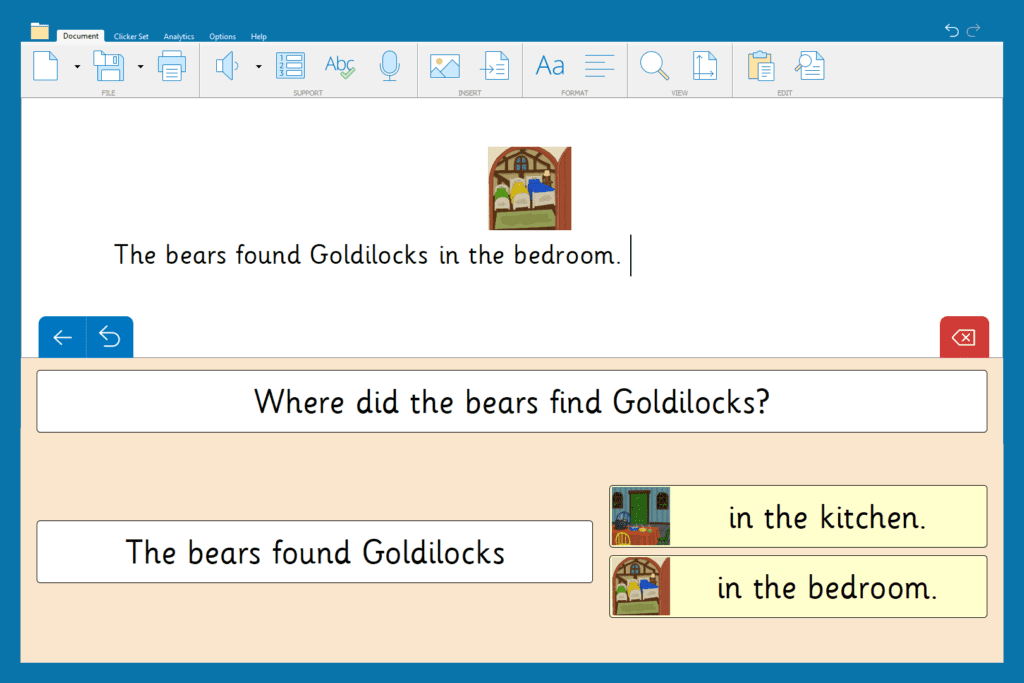
Our curriculum team has created a bank of differentiated activities that serve a range of student needs. These resources are found in LearningGrids and cover a wide range of topics and subject areas.
Connect Sets offer students more autonomy when building sentences and encourage the use of key vocabulary, phrases, and punctuation. They can be used following a read aloud to check for understanding and to address specific needs or misconceptions. Teachers can then tailor their lessons and plan for future instruction.
If you are looking for more traditional stories, that are supported by a range of literacy activities, check out our growing collection in the Story Corner.

For other literacy resources that are great for young learners, look at these blogs:
Twenty-five years ago, my classroom was filled with chalkboards, overhead projectors, and handouts. Technology was used sparingly, and classrooms had only a few computers for an entire room of children. Now, technology has transformed the classroom with interactive whiteboards, learning management systems, and loads of educational programs for students. Teachers and students have access to a wealth of information right at their fingertips.
As an educator, this shift required me to evolve, as I had to learn new tools, incorporate technology into my lessons, and embrace the change. It wasn’t always easy, but it reminded me that teaching is, at its core, about lifelong learning - for both the teacher and the student.
With these changes has come immense success. There is nothing quite like seeing a student “get it.” Those moments of understanding and accomplishment, when a student realizes they can do it! Technology plays a huge part in helping students learn and can bridge gaps for students who otherwise struggle with the traditional ways of learning.
Clicker is literacy software that supports all students, not just your struggling readers and writers.
Here are 5 things about Clicker that promote the reading and writing outcomes of students:
- Accessibility for all students
- “Teacher, I’m stuck!”
- Clicker Boards for planning support
- Save time with LearningGrids
- Analyzing student work
1. Accessibility for all students

Every student in your classroom comes with their own unique set of strengths and challenges making teaching a complex yet rewarding experience. Clicker opens the door to students with a range of learning needs.
Clicker has a wide array of supportive features that are designed to support students of all abilities. The support tools, such as voice feedback, predictive text, spell check, and voice recording, can all be tailored to meet the needs of your students. Clicker also has Eye Gaze settings and Switch options to support access to the onscreen keyboard, SuperKeys, and more.
2. “Teacher, I’m stuck!”
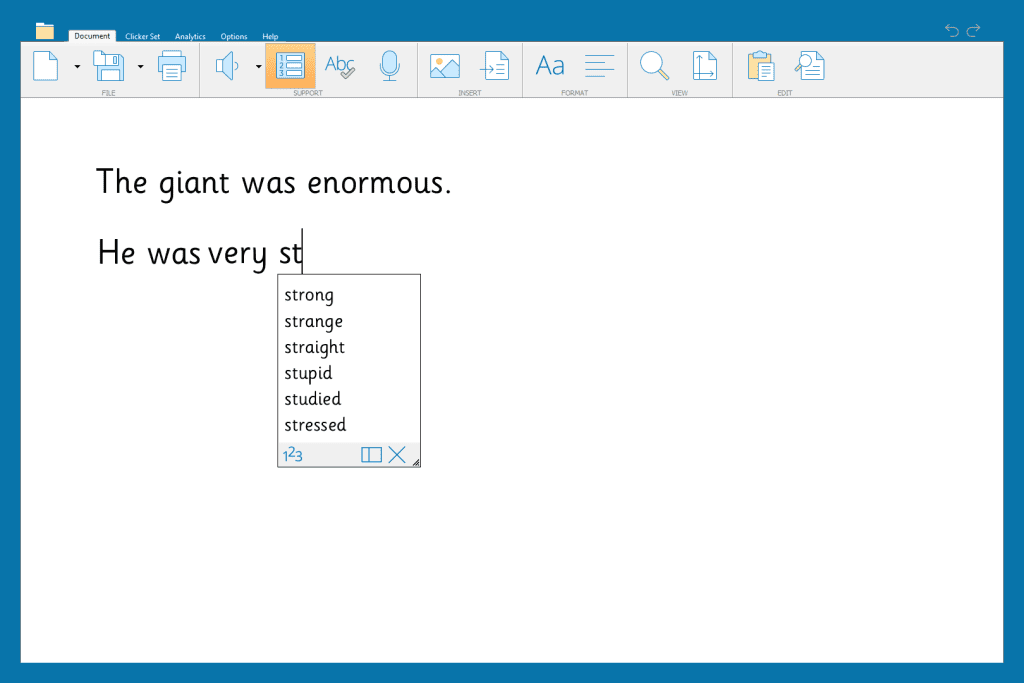
One thing that I often noticed in my classroom was students who would “get stuck” or not have an idea to start with. The built-in Predictor provides a word list that suggests what the student might write next. When starting a sentence, the predictor provides high frequency words and in the middle of a sentence, the word list changes to suggest words based on the context of the student’s writing.
Using the Predictor can improve your students’ writing fluency by supporting the transfer of ideas to the page while also improving spelling, grammar, and sentence structure.
3. Clicker Boards for planning support

Another way Clicker helps students who struggle to get their ideas on to the page is with Clicker Boards. This is a tool that can be used by individual students or with your whole class. It is a flexible mind mapping tool that students can add to with text, pictures, and even voice recordings! Clicker Boards can also be instantly sent to a document while your students are writing.
4. Save time with LearningGrids

One of the more time-consuming aspects of teaching is finding resources for the curriculum that will be engaging for our students. Keeping the attention of an entire class can be difficult but with LearningGrids, it is easy to find cross-curricular activities that are accessible to all students.
Topics are simple to search for, and the resources can be edited to provide the exact support your students need.
5. Analyzing student work

Teachers all know the big D word…DATA! We love analyzing student work to plan for instruction and meet the needs of our students, but it takes a lot of time and teachers have less and less time during their day! Clicker’s Analytics tool gives us information about our students’ writing process. Imagine a tool that shows you at a glance how your students produced their finished piece of writing.
For example, Analytics displays the words corrected by the spellchecker so specific spelling patterns can be taught during small group phonics instruction.
These are just 5 ways that Clicker supports the reading and writing outcomes of your students.
Here are some other resources you might find helpful: