Before the end of the academic year, we spoke with Helen Pearce and Gabrielle Deed from the Learning Pathways Academy Trust in the UK to hear how Clicker has impacted their teaching and learning.
As Special Education Coordinator and Head of Inclusion at their respective schools, both had a key interest in Clicker’s ability to support a wide range of needs and remove barriers to learning. Gabrielle’s school, Lyons Hall, was focusing on using Clicker as a writing tool for younger children, and Helen’s school, White Hall, was utilizing Clicker’s tools to support students with speech and language needs.
Both schools found great success using Clicker to support their focus groups and have identified countless positives when using the software.
Gabrielle
“…the versatility, the user-friendly tools, the way it empowers our children to achieve success in their writing, the confidence boost Clicker gives them… it’s hard to pick just one!”
Helen
“Clicker is just so different from anything else out there. For what you get in Clicker – you might be able to find other products that enable you to do certain aspects, like the talking books or recording activities, but with Clicker, everything’s there all in one place, all child-friendly and accessible – that is just amazing.”
They were also amazed by Clicker’s bank of ready-made resources, LearningGrids, and the different levels of scaffolding they provide.
Gabrielle
“[it’s] one tool that can support children with many different literacy difficulties across the school.”
Helen
“There’s support and resources for History, for Geography, for Science… Clicker’s not just for English or Literacy, it’s for everything.”
Both Gabrielle and Helen have had stand-out successes that they shared with us, where Clicker has significantly helped the progress of students, including:
- A student who struggled to share their fantastic knowledge due to writing and reading challenges
- A 4th grader with significant speech difficulties
- Children who needed to regain ownership of the writing process
You can read all about their progress in detail on our website - Learning Pathways Academy Trust - Clicker success story.
Former secondary SENCo Georgina Durrant is a popular blogger and published author on a mission to ensure that all children with SEND are fully included and receive the best possible support.
Georgina’s SEN Resources Blog is an award-winning site founded to share her thoughts, recommendations, activity ideas and favourite learning resources.
Georgina has just reviewed DocsPlus, and we wanted to share her fantastic feedback with you!
“I’ve had the pleasure of trialling the software over the last few weeks, and I can’t tell you enough how refreshing it is to find a word processor that’s actually designed for education and meets the needs of secondary school students with SEND. It has some absolutely amazing features that will make a huge impact on children with SEND.
When I was a secondary SENDCo we’d have to use the regular word processor on the computers, and whilst they obviously do their job, they are predominately designed with adults in mind and don’t offer the support that many children with SEND need. Looking back, I really wish I’d had DocsPlus then!
This is everything I wish a word processor would be. This might sound a little over the top, but I genuinely mean it. I’ve sat countless times with secondary school students in the computer room writing up work (as well as supporting students that use word processors to write their work instead of pen and paper) and been frustrated on their behalf that the word processor they use couldn’t help them just a little bit more! Apart from spelling and grammar checks (which can be problematic for lots of children in the usual form… how are they supposed to know which of the spelling suggestions it provides is the correct one?) there isn’t that much extra that word processing software offers kids in terms of support. DocsPlus solves this problem. It is fantastic. It somehow manages to delicately find the balance between offering great support whilst still feeling ‘grown up’. It’s easy to use, has tons of clever features, and makes writing more accessible for children of all abilities.
For students who have fantastic ideas but struggle to get them onto paper, this is a game changer!”
You can read Georgina’s review in full, including a rundown of her favourite DocsPlus features, on The SEN Resources Blog.
Here at Crick, we’ve all been working hard to get ready for the launch of Clicker Books for iPad and Chromebook. Now it’s here with beautiful illustrations and a huge range of resources, I can’t wait to share what’s in store for you and your learners.
Clicker Books makes lesson content more accessible and engaging for children of all abilities. Watch your students’ reading confidence and topic comprehension grow as our talking books bring the elementary curriculum to life. Alongside Clicker 8 and Clicker Writer, this latest addition to the Clicker Apps family is available to everyone who has a current Clicker subscription.
“We’re using the pre-made Clicker Books to introduce topics on a one-to-one basis. In the new academic year, we plan to use them on the interactive whiteboard for whole class work. I’m really amazed by how much there is in LearningGrids – the scope and variety of resources is incredible.”
- Anita Clarke, SENCo at Cringleford Primary
New app, new resources
As many of our staff members have worked in education, we understand how short on time teachers are. That’s why our new app comes with hundreds of age-appropriate books available for immediate use.

Whether you’re looking for timeless tales like Jack and the Beanstalk or non-fiction resources to introduce the stages of the water cycle, our LearningGrids portal gives access to an extensive collection of creative stories and curriculum-based books.
Plus, our wonderful curriculum team will be adding exciting new titles regularly.
Build independence in your readers

Clicker Books offers the fundamental reading support that we love on the PC version of Clicker. Features like speech feedback and word highlighting provide instant visual and aural reinforcement, which is so powerful for early or struggling readers.
One of our most important aims for Clicker Books is to boost confidence in our users, so we have included a simplified “Read It Yourself” version with many of our book sets. Specifically created to encourage children to access the content unassisted, these resources help students explore words they’re unsure of independently and build a greater sense of personal achievement.
Helping readers become writers

As your students grow in confidence, Clicker Books also provides a creative way to show how much they’ve learnt.
Unleash your children’s artistic flair by helping them write their own stories using our ‘Make a Book’ sets. With customisable writing support and the ability to add in their own photos, drawings and videos, creating a book that’s theirs will get even the most reluctant of writers excited about literacy again.
Take Clicker Books anywhere
Of course, no application would be complete without the ability to seamlessly transfer from device to device and continue where you left off. For those with a Clicker Site Licence, children can continue work at home on their own devices too.
Free access for current subscribers

We’re excited to welcome Clicker Books to the Clicker Apps family and can’t wait to update you on some other new additions we have planned for later this year.
Clicker Books is completely free to access for our Clicker 8/Clicker Writer subscribers - these easy-to-follow support guides will help you get started.
Don’t have Clicker?
If your school doesn’t have a Clicker subscription and are interested in finding out how it can benefit you and your students, we offer free 15-minute consultations where we’ll discuss your needs and how Clicker can help.
Contact us here and a member of our team will be in touch to find a time that suits you best.
Earlier this term, my daughter brought home a list of Year 1 common exception words that her school would like us to practise spelling with her.
Whilst we have spent some time writing these out, we realized during lockdown that she engages more enthusiastically with tasks like this when we approach it in different ways and bring Clicker into the mix!
First, I created a quick Matching activity where she could listen to the target word and then try to match it with the correct choice from the list. She really enjoyed being able to work her way through this independently.

Next, I opened LearningGrids and selected the ‘Word List One A – Z’ resource - a speech-supported Word Bank containing common words that early learners are likely to meet during their reading, including common exceptions.

For each word, my daughter started off by trying to find it in the Word Bank. If she got stuck, she was able to have Clicker read the choices out to her. Once she’d found it and had a look at it, we minimized the Word Bank and she attempted to spell it out using Clicker’s lowercase onscreen keyboard. Every time she completed a word, Clicker read it out to her, offering an opportunity to check if she was correct. This also encouraged her to attempt the next word.
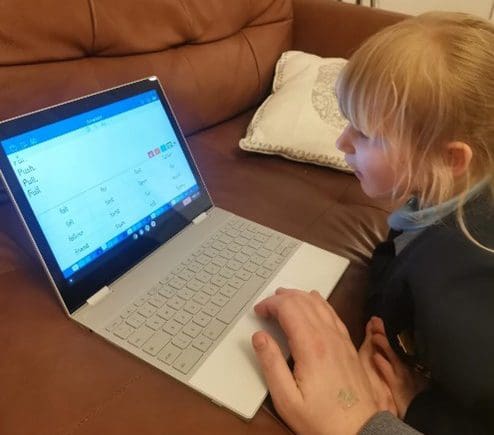
Young emergent writers (particularly left-handed ones like my daughter and myself!) can find the process of physically writing quite arduous at times. Clicker enabled us to strip the activity right back and focus purely on the core learning objective of reading and spelling target words. It’s also a lot easier to go back and change things when you make a mistake, which is particularly useful for my child as she gets frustrated when she ‘spoils’ her writing with crossing out or smudges.
Most importantly, she was really proud of what she managed to achieve, was eager to practise her spellings again the next day and is making great progress.
I think that’s one of the best things about Clicker – you can take any topic or learning objective and in a matter of minutes watch a child experience real success as they access it at a level that’s just right for them, in a way that they find fun!
Do you use colorful semantics in your classroom? Colourful semantics is an approach designed by Alison Bryan to help students develop their grammar skills and support them with sentence structure. Sentences are cut up and the words are color-coded by their role in the sentence.
Recently Tom McDonald, of access: technology, explored using Clicker to help with colorful semantics.
"Coming from a teaching background I am familiar with the time it takes to create resources for colorful semantics. In the past I would create the symbols I would need all with the right colored background. I would then print, laminate and cut the symbols. I would then sometimes even add Velcro to the reverse. If this is sounding familiar to you, then please rest assured that there is another way which can cut the time it takes to make the resources as well as being able to include the student in the process at the same time. All this is done using Clicker."
Tom shared a short video about how he created an accessible colorful semantics activity centered around Julia Donaldson’s story “Zog”:
On LearningGrids, you’ll also find Clicker Sets to support colorful semantics and lots of other grammar activities.