The Education Endowment Foundation’s SEND Specialist Gary Aubin explores how teachers can support students with SEND in their daily practice.
Meeting the range of needs presented by a class of children is undoubtedly a challenging task. However, research suggests that there are approaches which teachers can employ to support learning and improve outcomes for all students, including those with Special Educational Needs.
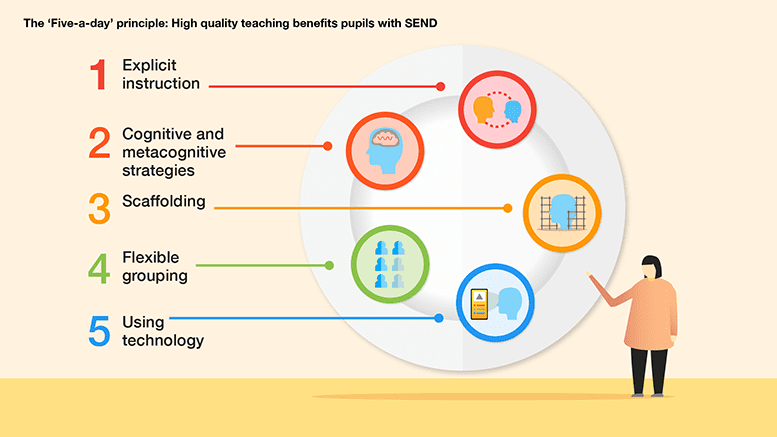
The evidence which informed the EEF’s ‘Special Education Needs in Mainstream Schools’ guidance report indicated that there are five particular approaches that can be integrated into day-to-day teaching. These practices aim to raise attainment among children with additional needs, as well as their classmates.
Best of all, this ‘five-a-day’ is already part of most teachers’ practice (or can be relatively easily added), meaning that small tweaks could make a significant positive difference for the students you teach:
SENDCos have a specialised knowledge of the steps practitioners can take to support students with additional needs. They know the areas where their school excels in this regard, as well as what the evidence suggests in terms of making purposeful improvements. But how can SENDCos take their own knowledge and ensure it meaningfully impacts teachers’ practice in classrooms?
More so than ever, teachers are juggling numerous competing priorities – some old and some brought on by the pandemic. As a result, exploring evidence relating to supporting students with SEND might understandably fall down their lengthy to-do lists.
Fortunately, the best available research indicates that gains can be made for students with SEND without an overhaul of existing practice. The ‘five-a-day’ strategies highlighted by the EEF are likely to be familiar to teachers already and are particularly well-evidenced as having a positive impact.
The EEF recommends that teachers develop a repertoire of these strategies, which they can use daily and flexibly in response to individual needs, using them as the starting point for classroom teaching for all students, including those with SEND.
Here’s what the five strategies involve:

More information
- Share the EEF’s ‘five-a-day’ poster with staff to ensure there is a shared understanding of these strategies and what they entail.
- Visit the EEF blog for an overview of the ‘five-a-day’ approach.
- Explore the guidance report in full, including case studies and implementation examples for each of the ‘five-a-day’ strategies.
In the summer term, I hosted a webinar with inclusion expert, Jules Daulby, that focused on engendering independence for SEND learners. At a time when many schools are planning for transition from Year 6 to secondary school, Jules shared some great tips with SENCOs and school leaders on how technology can be used to ensure quality teaching and learning.
Here are my 5 takeaways from the session:
- The importance of keeping up, not catching up. We need to focus on keeping up and focus on strategies that can enable this, such as quality-first teaching, the use of technology and the importance of scaffolding and differentiation.
- Using visuals to scaffold and support learning, from pre teaching of vocabulary, to supporting retrieval practice in class lessons, to opportunities to reflect on learning. Visual prompts are also powerful for supporting learners who struggle with planning and sequencing. For example, DocsPlus includes Workspace, a powerful mind-mapping tool. In LearningGrids, teachers can find hundreds of ready-made templates linked to curriculum topics or writing genres. Jules described how she had easily adapted these to increase support and scaffold.

3. Encourage students to talk about the topic using Voice Notes. They can use their oracy as an alternative or to support writing, enabling learners to fully participate in planning and creating pieces of writing. Using Voice Notes in the WorkSpace allows students to have spoken prompts alongside text and visuals.

4. Technology is useful in removing barriers. Jules talked about building on the skills developed during lockdown, when many students had access to laptops at home, to support our SEND learners. Continuing to provide access to technology in the classroom can allow students to build on this familiarity and support. Allowing access to technology across all platforms and curriculum areas is key, as well as extending this provision across the whole class, not just to SEND students.
5. Use technology to continue support in exams. For students who are entitled to a reader in exams, DocsPlus can read a PDF out loud (including text highlighting). This provides seamless support from everyday classroom tasks to exam support. Jules noted that whilst students are not allowed to have a human reader in English exams, they are allowed to have a screen reader
To request a full webinar recording, or to find out more about how DocsPlus can support writing in your school, contact us on 01604 671691 or email info@cricksoft.com.