Table of contents
We recently reached out to Julie Brown, an assistive technology specialist, for her take on how assistive technology has changed over the years and her guidance on what using assistive technology to support learners really looks like when done well.
By Julie Brown, Advisory Inclusion Teacher for Assistive Technology, Durham County Council, UK
When I’m asked, “So what actually is assistive technology?” - it’s never a quick answer.
For some, it means expensive equipment. For others, it’s a vague concept they’ve heard in passing during teacher training. But in my world, assistive technology (AT) is a powerful enabler. It makes learning possible, not just easier, for many of the children and young people I work with.
In this post, I want to unpack what assistive technology really means in schools - through the lens of my experience, the changes I’ve seen over the years, and where tools like Clicker and DocsPlus fit into this picture.

My role: Meeting learners where they are
I’m an Advisory Inclusion Teacher for Assistive Technology, working as part of Durham County Council’s SEND (special educational needs and disabilities) and Inclusion Service. Our team is structured around the four areas of need in the SEND Code of Practice:
- Cognition and learning
- Communication and interaction
- Sensory and physical
- Social, emotional, and mental health
I currently split my time between the vision impairment team and the cognition and learning team, supporting students who face barriers to accessing the curriculum - whether those barriers are physical, cognitive, or a combination of both.
My role is highly varied. I support schools by:
- Delivering staff training
- Conducting assessments
- Advising on software and equipment
- Guiding interventions for individual students
I’ve worked in this field for over 17 years. Before that, I was a teacher for nearly a decade. That means I’ve supported students before and after the arrival of modern classroom technology - and I’ve seen just how transformative the right tool can be.
How assistive technology has evolved in schools
When I first joined the local authority (school district), the phrase we used was “access technology” - focused largely on physical access to the curriculum. But that term felt too narrow. The rest of the world had moved on to the more inclusive term assistive technology, so we followed suit and now use the term assistive technology.
In the early days, classroom tech meant a single computer tucked into a corner. It was one-size-fits-all - and it became clear very quickly that many learners couldn’t access it. So specialist tech was developed: devices and software that could support students with physical or sensory impairments. That worked, but it also made AT feel separate in the classroom and something reserved for a few select students.
What’s changed - and what excites me most - is that we now have assistive technology that works on standard devices and benefits all learners. We’ve moved from separate systems to an overlap, where tech isn’t just reserved for specific situations but can be utilized by all students. Tools like Clicker and DocsPlus live in that shared space of offering personalized support and wide accessibility at the same time.
Assistive tech is not exclusive, it’s inclusive!
Assistive technology - a luxury or a lifeline?
One of the most important distinctions I try to make when talking to schools is this:
“For most, technology is an optional extra. But for those who need assistive technology, it’s essential.”
That’s a crucial mindset shift.
In many classrooms, technology is seen as a nice-to-have: a faster way to do things, a focus on efficiency. But when we talk about assistive technology, we're not talking about convenience. We're talking about access.
We’re talking about the difference between a child being able to express themselves independently or relying on an adult to speak or write for them. Between a student being able to engage with the curriculum using whatever assistive technology tool they require or being unable to participate in the lesson at all.
I work with children who, without assistive technology, couldn’t meaningfully access the curriculum at all. They wouldn’t be able to write, read, or join in with peers.
Assistive technology is not just a tool; it’s a bridge to equal learning opportunities.
From low-tech to high-tech (it all counts!)
When we talk about assistive technology, it’s easy to jump straight to the high-tech end - laptops, iPads, speech-to-text software, or eye gaze systems. But assistive technology covers a wide spectrum:
- Low-tech: visual schedules, pencil grips, sloped writing boards, colored overlays, communication books, talking tins, adapted scissors
- Mid-tech: voice recorders, talking spell-checkers, basic word processors
- High-tech: switch access, screen readers, symbol-supported writing tools, software like Clicker and DocsPlus
The key is that it’s not about how fancy or expensive a piece of equipment is - it’s about whether it enables a learner to access their education more fully and independently.
Tech integration in schools: What are the challenges?
Despite all the advances, one of the biggest barriers I encounter today isn’t the child’s difficulty: it’s the practical challenge of embedding technology consistently across classrooms.
Sometimes that’s down to confidence, competing priorities, or simply not having enough working devices. Budgets are tight, hardware can be unreliable, and not every teacher has had the training or time to explore what assistive technology can really offer.
I’ve seen students move from one lesson where they’re supported with a carefully planned DocsPlus writing grid, to the next where they’re asked to put the laptop away - not because staff aren’t on board with the provision, but because the tools aren’t yet embedded across the whole setting.
This inconsistency isn’t about blame, it’s about capacity.
When assistive technology is used consistently and confidently, it has the power to transform not just progress, but independence. The more we understand it, the more we can harness its potential for every learner.
Where Clicker and DocsPlus fit in the assistive technology spectrum
I’ve used Clicker for 25 of my 26 years in education (and I don’t say that lightly!).
Clicker and its secondary counterpart, DocsPlus, sit right in the middle of the assistive technology spectrum.
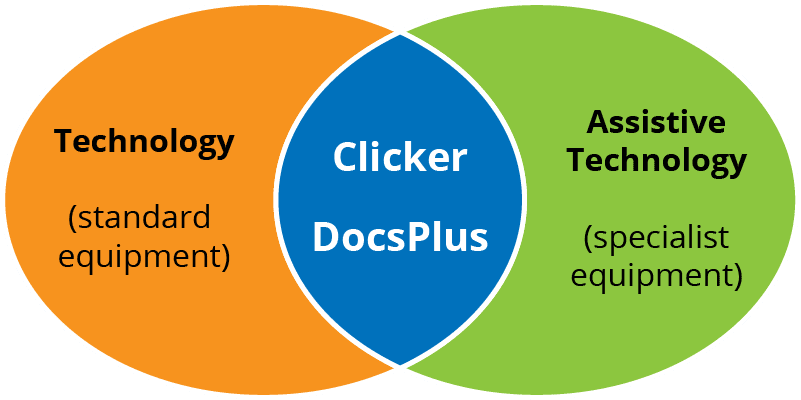
They’re:
- Flexible enough to run on standard school devices
- Inclusive enough to support a huge range of learners
- Designed from the ground up with SEND in mind
They’re ideal for students who:
- Struggle to get their ideas onto paper
- Have working memory difficulties
- Experience barriers with handwriting, language, or executive functioning
- Are non-verbal or require speech feedback
- Need structure, scaffolding, and reassurance - not a blank screen
Clicker isn’t just a “tool for struggling writers.” It’s a literacy support platform that grows with the child.
In secondary settings, DocsPlus continues that journey - providing structured support while encouraging ownership and independence. I’ve used DocsPlus with students who have cerebral palsy, muscular dystrophy, visual impairments, and dyslexia. It offers scaffolded independence - a term I come back to again and again.
It gives students the space to succeed on their own terms.
So… what is assistive technology?
Assistive technology is not an add-on. For many learners, it’s the key to accessing education at all. It bridges gaps. It removes barriers. And it empowers.
But it only works if we understand it, value it, and implement it well.
Clicker and DocsPlus are two of the most effective tools I’ve seen in all my years supporting children with SEND. They don't ask children to fit the mold - they help shape the tools to fit the child.
That, to me, is what real assistive technology is all about.