Table of contents
Recently, we met with Gemma Gwilliam, Head of Digital Learning, Education and Innovation for the “Portsmouth: The Digital City” Project in the UK, to gain an insight into the huge impact she has made in developing digital literacy across schools Portsmouth.
Gemma has led a coordinated approach to raising digital confidence among staff and students. This has ensured that tools like Clicker and DocsPlus are embedded into everyday learning rather than treated as add-ons.
Her work has supported teachers and support staff to embrace technology with purpose and enabled students to build the skills they need to thrive in the classroom and beyond.
Here, Gemma shares her top tips for building digital confidence in students, teachers, and the wider school community.
“It’s not an add-on. It’s how we do things now.” - Amy Quade and Nicci Sawdy, class teachers and Assistant Heads of Digital
First, build teacher confidence
When I began working on digital literacy in Portsmouth, it quickly became clear that the main challenge wasn’t the technology, it was the staff confidence. Many didn’t feel comfortable enough in their digital skills to introduce new technologies to the classroom, or to teach the students how to use them. So, we started tackling that confidence gap and quickly saw positive results. One elementary school teacher even told me that they used to avoid technology in their classroom, but now feel confident using it thanks to step-by-step training.
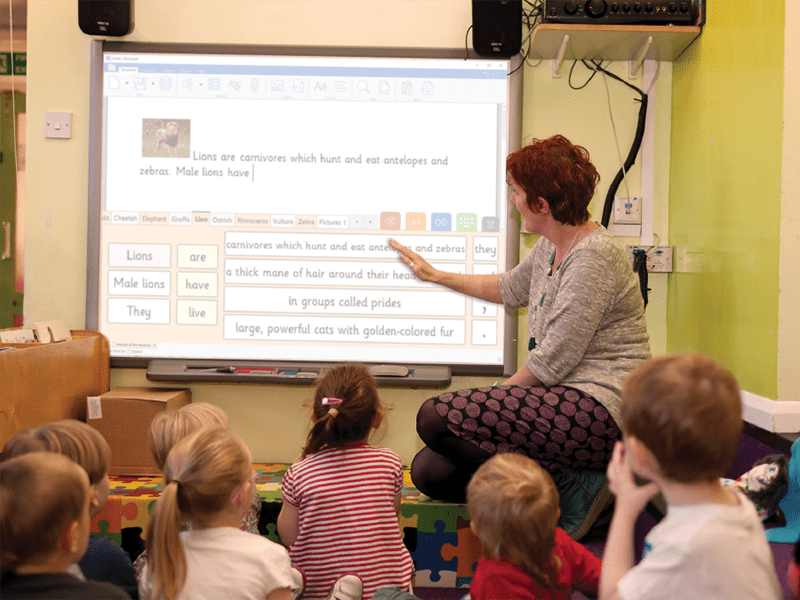
Here’s what worked:
Start with the “why”
Our teachers and support staff are incredibly busy with lots of spinning plates. It was important to them that they understood the purpose behind using digital tools. It isn’t about technology for the sake of it - it’s about independence, inclusion, and better outcomes for learners. Once we explained the rationale and they understood it, engagement grew!
Even schools without the infrastructure to get started can begin here. Defining your “why” and embedding it into your school development plan ensures digital learning is part of your long-term vision.
Model and demonstrate
Show staff the tools in action so they gain confidence. A quick demo or a colleague modeling new technology in a real lesson makes the hypothetical tangible. It helps teachers to visualize using the technology in their own classroom and bridges the gap between no-tech and purposeful-tech.
Teachers in Portsmouth have used screen sharing to model tasks step-by-step, helping students and other staff members see exactly what the new technology looks like.
For example, we’ve then had staff members visiting different schools based on the way they want to use Clicker. This has included visits focused on oracy, writing, math, and reading.
By sharing knowledge in this way, teachers and support staff can use technology to its full potential. One special education coordinator told me that they have been able to make huge progress with their students now that they have the right digital tools.
Make it part of everyday teaching
The more teachers embed the use of technology in routine lessons, the less daunting it feels. This has a positive impact on the students’ confidence, too. Showing our staff how everyday use benefits them reinforces the message that technology should be purposeful and impactful.
“The project opened a whole new world of opportunities for our staff and children—from cost-saving tools to training that’s been inclusive, practical, and judgment-free.” - Senior Leader on the impact of “Portsmouth: The Digital City” Project
Start small and celebrate little wins
Begin with basic features (don’t overload the staff!) and celebrate each step forward. Recognition of progress motivates people to keep going, and keeps the technology on everyone’s radar for positive reasons.
For example, following our own training with Siân from Crick, we always have first-time users start with a blank page. We then have them use it as a word processor with the accessibility features enabled, including the speech-feedback option.
Next, we move onto the pre-made resources but in a progressive format as we would with our young people. We begin with Sentence Sets, progress to Connect Sets, and then move on to Word Banks.
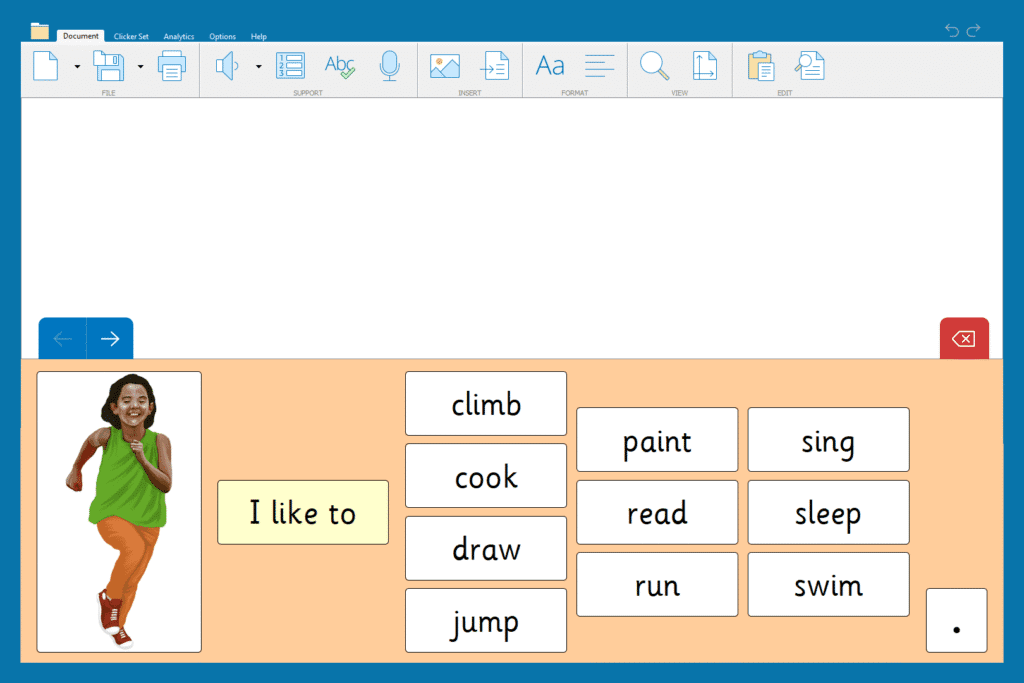
We also ensure that this training aligns with the outcomes we want for our young people, or the problem we’re trying to solve.
Next, build student confidence
For students, the starting point is often even simpler. Some children need to be taught very basic digital skills before they can make meaningful use of classroom software.
“When I use speech-to-text, it helps me explain my ideas.” - Grade 2 student
Don’t assume any digital skills and teach the basics
It’s easy to assume that your learners already know the basics of using technology, but that isn’t always the case. Begin by teaching students to turn devices on, log in, use a mouse, and open a file.
Once they have that foundation, they can grow and, importantly, they learn how to independently access their devices.
Emma Ramsey at St. Judes Primary introduced a great way to embed digital skills in her school. During morning attendance, her students use laminated Chromebook keyboard sheets so they can practice typing their login details. It’s an innovative way to practice this key skill even if you don’t have access to devices that day. This method worked so well that we shared it with our lower elementary classrooms across the city.
Then embed skills in real learning
Once students have the basics covered, digital skills are often best taught in context. Let students practice them while writing a story, researching a topic, or publishing their work.
Encourage everyday use
Repetition breeds confidence, so give students regular, consistent opportunities to use the same tools across different subjects. Familiarity helps them feel secure using the technology independently and boosts their confidence when it’s time to try something new.
Allow time for exploration
Getting a new piece of technology is very exciting, so children will need time to explore on their own. Don’t expect students to stay entirely on task until they’ve had a chance to “try this” and “press that.” Give students permission to try it out without fear of making mistakes or not meeting a learning objective.

Celebrate success
Acknowledge every achievement - whether it’s a student completing work on a word processor for the first time or writing even more than they thought possible. Those moments are powerful and foster a positive relationship with technology.
Embedding digital skills across a school or trust
Building confidence at an individual level is essential - but it isn’t enough on its own. For digital tools to truly make a difference, schools and districts need a shared vision and commitment.
When only a few teachers or members of staff embrace digital learning, progress is patchy. Students have inconsistent experiences, and staff development remains uneven. A shared vision is the key to success.
“When everyone is onboard, digital skills become part of the culture - and that’s when I’ve seen real transformation happen.” - Primary School Head Teacher on the transformation they have seen with “Portsmouth: The Digital City” Project
Not sure where to start? Look locally
Schools unsure of how to begin can look at what’s happening in their local community:
- What tech do secondary schools use?
- What are other elementary schools doing?
- What digital literacy skills do secondary schools expect students to have when they arrive?
Aligning your digital offer helps reduce the digital divide and ensures smoother transitions for all students as they move through their education.
Here are some other lessons we’ve learned along the way in Portsmouth:
Create a shared vision
Leaders must clearly explain why digital skills matter. This explanation must connect them to priorities like inclusion, independence, and preparing children for the future. Technology for all includes considering parents and carergivers. Around 21% of US adults have low literacy, and it’s likely that a similar proportion of parents and carergivers may struggle with digital tasks. Schools should try to offer continuous digital access to students, especially with homework in mind, to ensure equity and support at home.
Lead by example
When school leaders use digital tools with confidence, staff are much more likely to follow suit.
Build consistency across classrooms
Students should see digital skills being used everywhere - from early phonics to upper elementary project work. That consistency normalizes digital learning and shows students that what they’re learning this year will also be important next year.
Invest in ongoing training
One-off sessions don’t stick. Staff need regular, hands-on training that evolves alongside their needs.
In Portsmouth, we began our Clicker and DocsPlus training as a small group of 15 schools, before expanding across the city. Now into the fourth year of this project, our Clicker Champions for the city are leading their own sessions based on feedback and priorities identified by schools.
For example, in October 2025, one of our leads will be demonstrating how to use Clicker for writing moderation and oracy. Another will be sharing how they use Clicker to support adaptive teaching in lower elementary. We then offer the opportunity to see this in action, deliver personalized training for the staff and school and even team teaching.
Celebrate collective success
Share stories of classes or grade groups who are embedding digital practice. In Portsmouth, celebrating these successes helped spread enthusiasm across schools.
Listen and adapt
When staff and students feel their voices are heard, they’re more willing to engage. Try and keep communication open and listen to whether staff members need more support – especially if it involves making sure that the technology runs smoothly. When tech doesn’t work, lessons become frustrating and teachers lose confidence in using it purposefully.
The results
When digital skills are embedded across a school or district, they stop being “something extra” and become a natural part of teaching and learning. Teachers feel supported, students feel capable, and technology is used to its full potential.
True digital transformation isn’t about devices or software - it’s about people. If we invest in confidence, consistency, and culture, the results are powerful!
Read our success stories:
Want to explore opportunities to build on your school’s digital literacy?
- Book a discovery call to see how Clicker and DocsPlus can support teachers and students.
- Read our blog post So, what is assistive technology?